» Download this section as PDF (opens in a new tab/window)
For a visual explanation, you can watch the following video: LINK
The Nutanix platform currently uses a resiliency factor, also known as a replication factor (RF), and checksum to ensure data redundancy and availability in the case of a node or disk failure or corruption. As explained above, the OpLog acts as a staging area to absorb incoming writes onto a low-latency SSD tier. Upon being written to the local OpLog, the data is synchronously replicated to another one or two Nutanix CVM’s OpLog (dependent on RF) before being acknowledged (Ack) as a successful write to the host. This ensures that the data exists in at least two or three independent locations and is fault tolerant. NOTE: For RF3, a minimum of 5 nodes is required since metadata will be RF5.
OpLog peers are chosen for every episode (1GB of vDisk data) and all nodes actively participate. Multiple factors play into which peers are chosen (e.g. response time, business, capacity utilization, etc). This eliminates any fragmentation and ensures every CVM/OpLog can be used concurrently.
Data RF is configured via Prism and is done at the container level. All nodes participate in OpLog replication to eliminate any “hot nodes”, ensuring linear performance at scale. While the data is being written, a checksum is computed and stored as part of its metadata. Data is then asynchronously drained to the extent store where the RF is implicitly maintained. In the case of a node or disk failure, the data is then re-replicated among all nodes in the cluster to maintain the RF. Any time the data is read, the checksum is computed to ensure the data is valid. In the event where the checksum and data don’t match, the replica of the data will be read and will replace the non-valid copy.
Data is also consistently monitored to ensure integrity even when active I/O isn’t occurring. Stargate’s scrubber operation will consistently scan through extent groups and perform checksum validation when disks aren’t heavily utilized. This protects against things like bit rot or corrupted sectors.
The following figure shows an example of what this logically looks like:
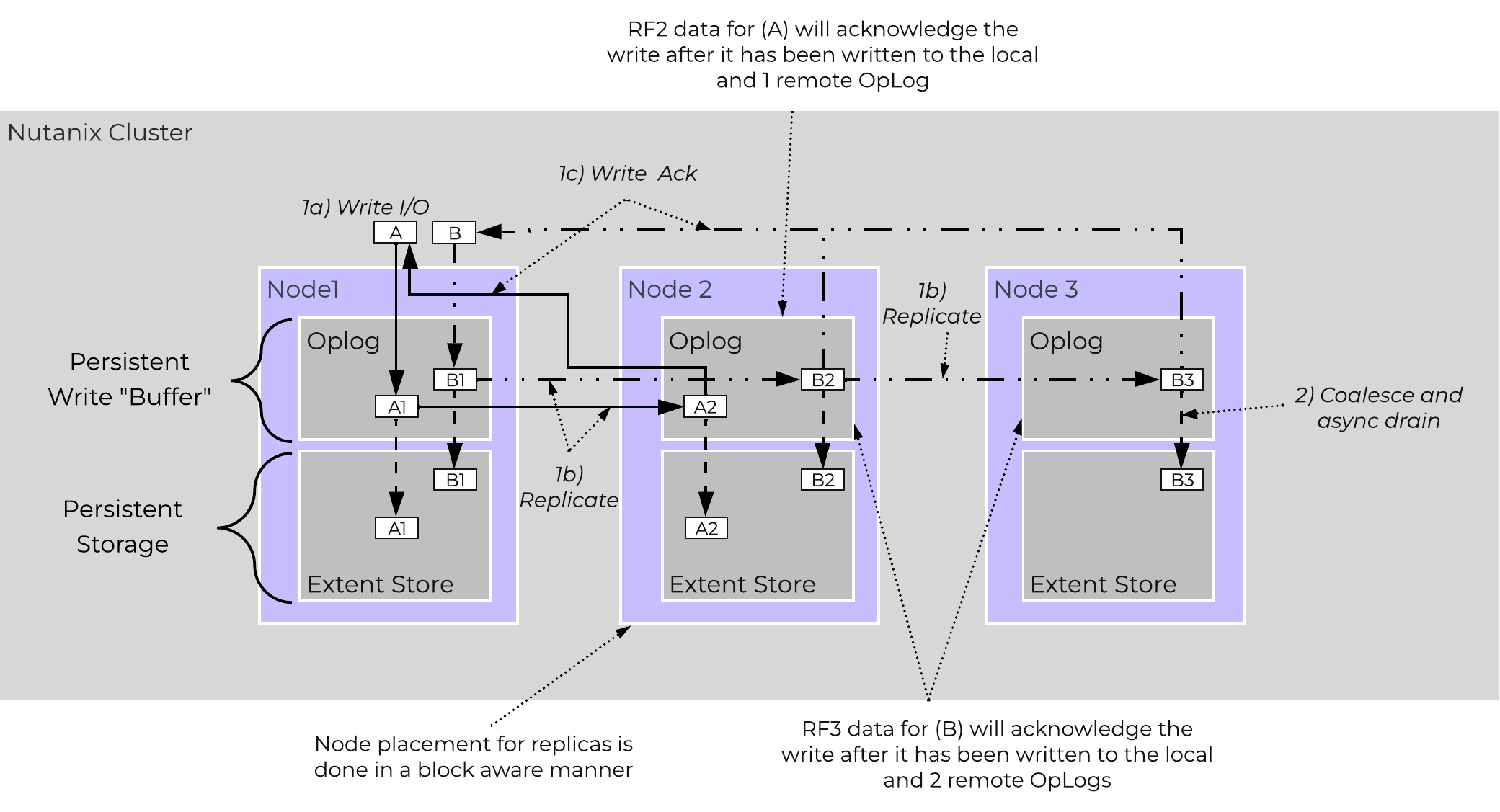 AOS Data Protection
For a visual explanation, you can watch the following video: LINK
Availability Domains (aka node/block/rack awareness) is a key struct for distributed systems to abide by for determining component and data placement. Nutanix refers to a “block” as the chassis which contains either one, two, or four server “nodes” and a “rack” as a physical unit containing one or more “block”. NOTE: A minimum of 3 blocks must be utilized for block awareness to be activated, otherwise node awareness will be used.
Nutanix currently supports the following levels or awareness:
It is recommended to utilize uniformly populated blocks / racks to ensure the awareness is enabled and no imbalance is possible. Common scenarios and the awareness level utilized can be found at the bottom of this section. The 3-block requirement is due to ensure quorum. For example, a 3450 would be a block which holds 4 nodes. The reason for distributing roles or data across blocks is to ensure if a block fails or needs maintenance the system can continue to run without interruption. NOTE: Within a block, the redundant PSU and fans are the only shared components.
NOTE: Rack awareness requires the administrator to define “racks” in which the blocks are placed.
The following shows how this is configured in Prism:
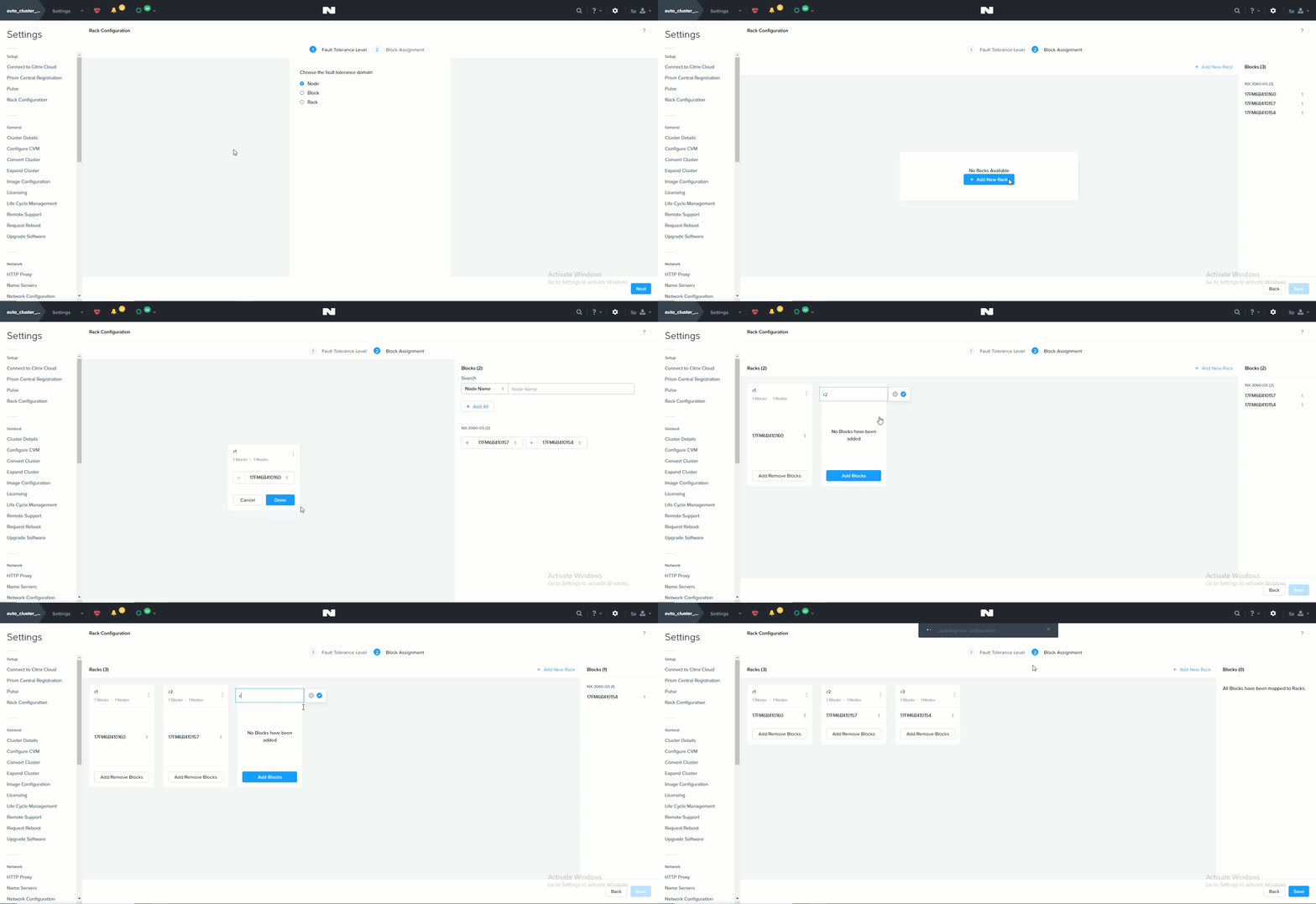 Rack Configuration
Awareness can be broken into a few key focus areas:
With AOS, data replicas will be written to other [blocks/racks] in the cluster to ensure that in the case of a [block/rack] failure or planned downtime, the data remains available. This is true for both RF2 and RF3 scenarios, as well as in the case of a [block/rack] failure. An easy comparison would be “node awareness”, where a replica would need to be replicated to another node which will provide protection in the case of a node failure. Block and rack awareness further enhances this by providing data availability assurances in the case of [block/rack] outages.
The following figure shows how the replica placement would work in a 3-block deployment:
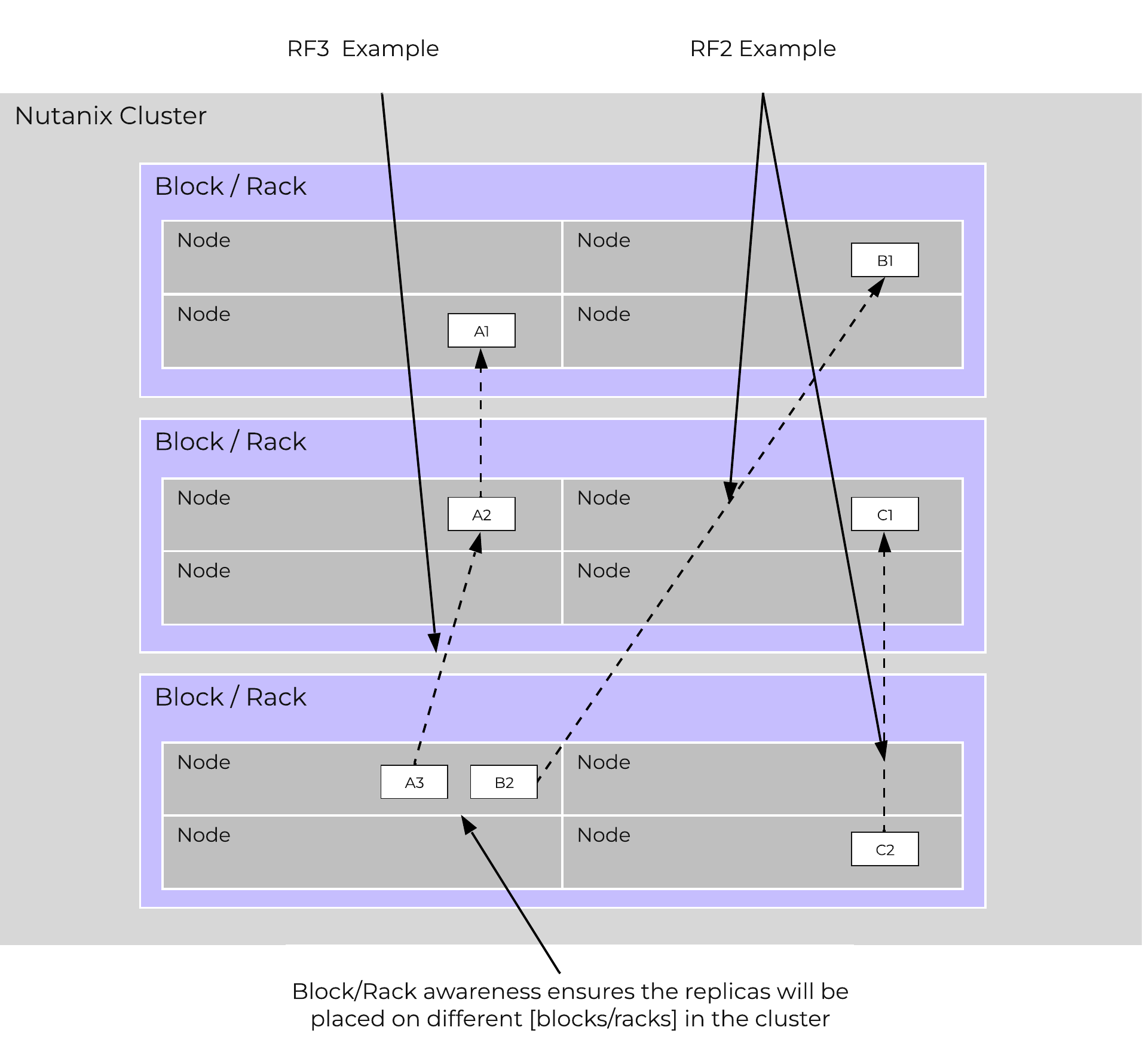 Block/Rack Aware Replica Placement
In the case of a [block/rack] failure, [block/rack] awareness will be maintained (if possible) and the data will be replicated to other [blocks/racks] within the cluster:
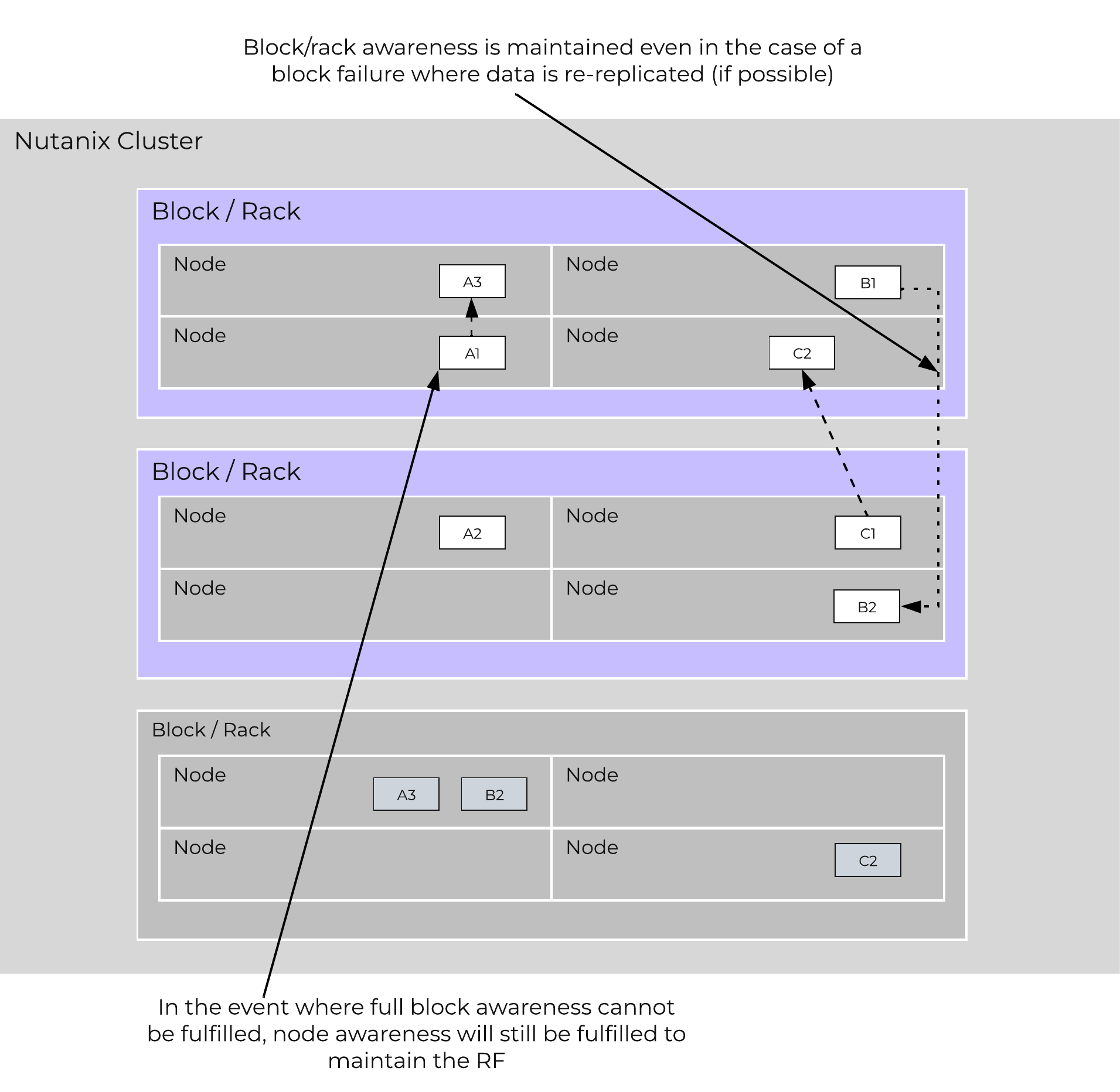 Block/Rack Failure Replica Placement
A common question is can you span a cluster across two locations (rooms, buildings, etc.) and use block / rack awareness to provide resiliency around a location failure.
While theoretically possible this is not the recommended approach. Let's first think about what we're trying to achieve with this:
If we take the first case where we're trying to achieve an RPO ~0, it is preferred to leverage synchronous or near-synchronous replication. This will provide the same RPOs with less risk.
To minimize the RTO one can leverage a metro-cluster on top of synchronous replication and handle any failures as HA events instead of doing DR recoveries.
In summary it is preferred to leverage synchronous replication / metro clustering for the following reasons:
Below we breakdown some common scenarios and the level of tolerance:
| Desired Awareness Type | FT Level | EC Enabled? | Min. Units | Simultaneous failure tolerance |
|---|---|---|---|---|
| Node | 1 | No | 3 Nodes | 1 Node |
| Node | 1 | Yes | 4 Nodes | 1 Node |
| Node | 2 | No | 5 Nodes | 2 Node |
| Node | 2 | Yes | 6 Nodes | 2 Nodes |
| Block | 1 | No | 3 Blocks | 1 Block |
| Block | 1 | Yes | 4 Blocks | 1 Block |
| Block | 2 | No | 5 Blocks | 2 Blocks |
| Block | 2 | Yes | 6 Blocks | 2 Blocks |
| Rack | 1 | No | 3 Racks | 1 Rack |
| Rack | 1 | Yes | 4 Racks | 1 Rack |
| Rack | 2 | No | 5 Racks | 2 Racks |
| Rack | 2 | Yes | 6 Racks | 2 Racks |
Block awareness operates on an opt-in (setting specifically in the Prism UI) or best-effort basis. For best-effort, when certain conditions are met (eg: minimum storage tiers per block, container replication factor setting, minimum number of blocks, free space in the storage tiers), then it will be enabled automatically. It is considered best practice to have uniform blocks to minimize any storage skew.
As mentioned in the Scalable Metadata section above, Nutanix leverages a heavily modified Cassandra platform to store metadata and other essential information. Cassandra leverages a ring-like structure and replicates to n number of peers within the ring to ensure data consistency and availability.
The following figure shows an example of the Cassandra’s ring for a 12-node cluster:
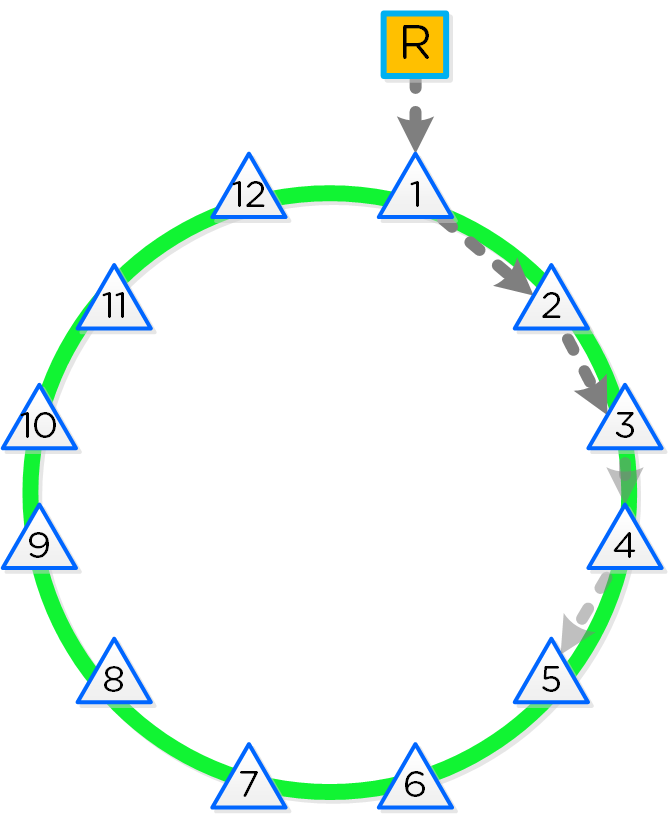 12 Node Cassandra Ring
Cassandra peer replication iterates through nodes in a clockwise manner throughout the ring. With [block/rack] awareness, the peers are distributed among the [blocks/racks] to ensure no two peers are on the same [block/rack].
The following figure shows an example node layout translating the ring above into the [block/rack] based layout:
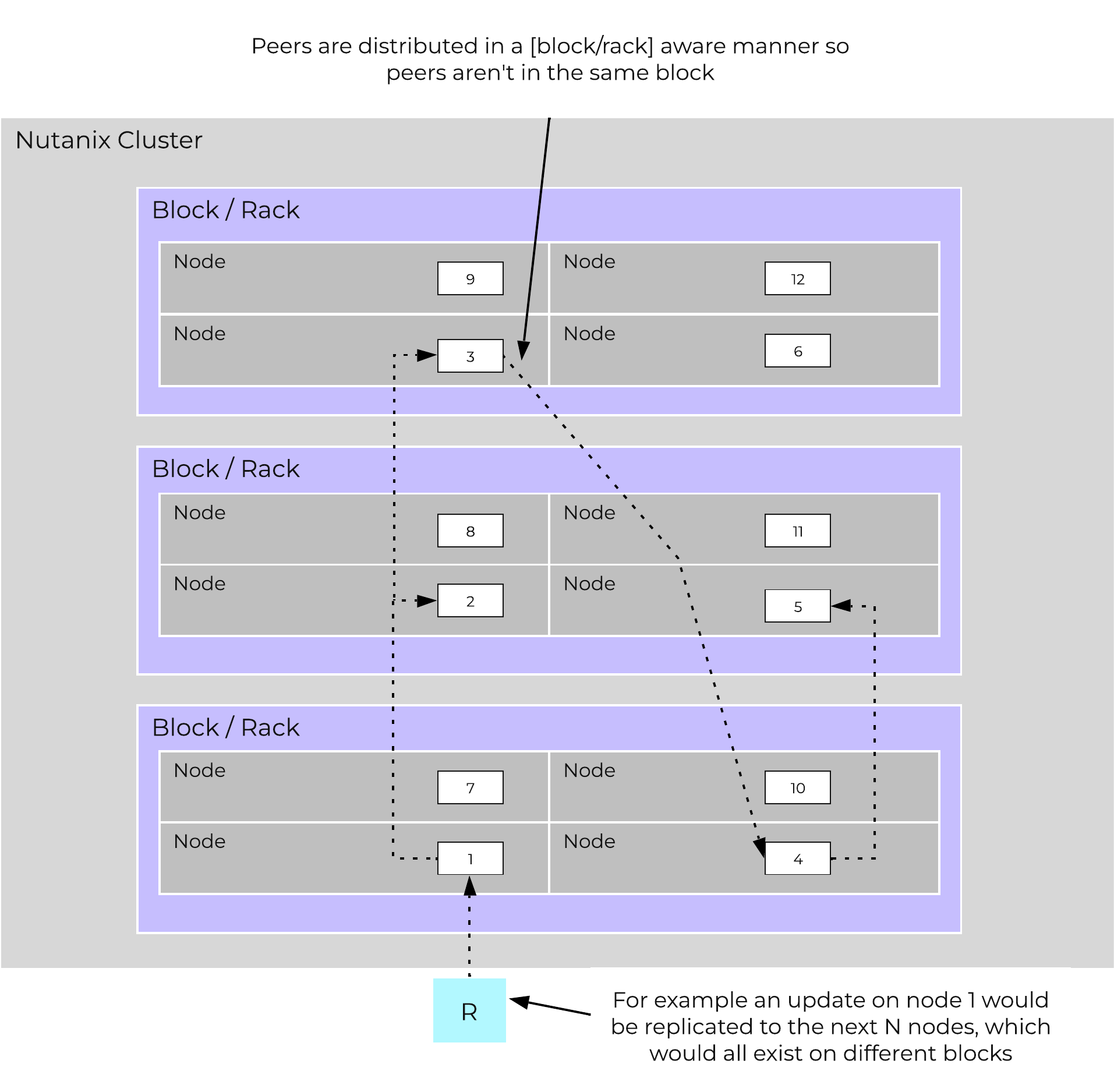 Cassandra Node Block/Rack Aware Placement
With this [block/rack]-aware nature, in the event of a [block/rack] failure there will still be at least two copies of the data (with Metadata RF3 – In larger clusters RF5 can be leveraged).
The following figure shows an example of all of the nodes replication topology to form the ring (yes – it’s a little busy):
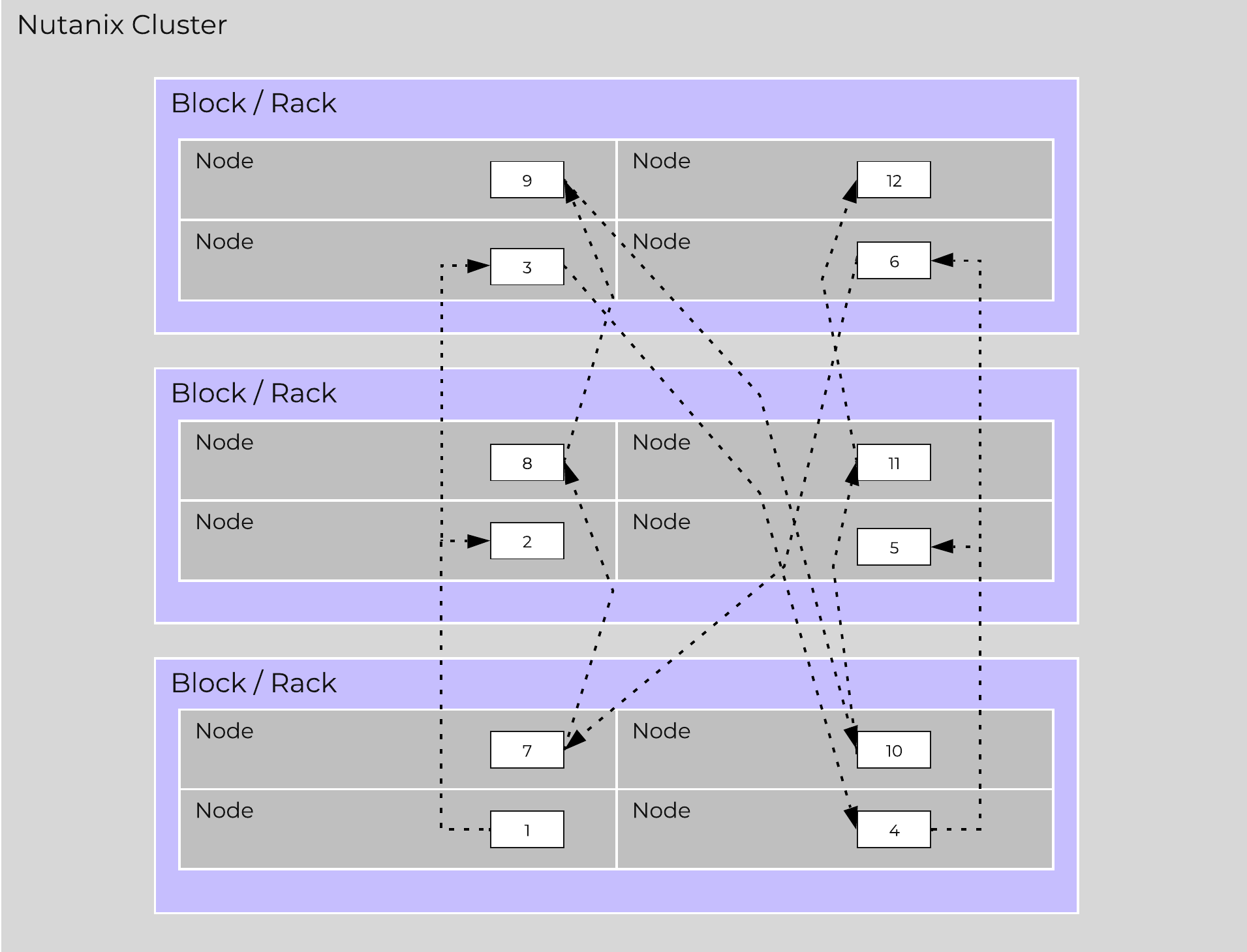 Full Cassandra Node Block/Rack Aware Placement
Below we breakdown some common scenarios and what level of awareness will be utilized:
Nutanix leverages Zookeeper to store essential configuration data for the cluster. This role is also distributed in a [block/rack]-aware manner to ensure availability in the case of a [block/rack] failure.
The following figure shows an example layout showing 3 Zookeeper nodes distributed in a [block/rack]-aware manner:
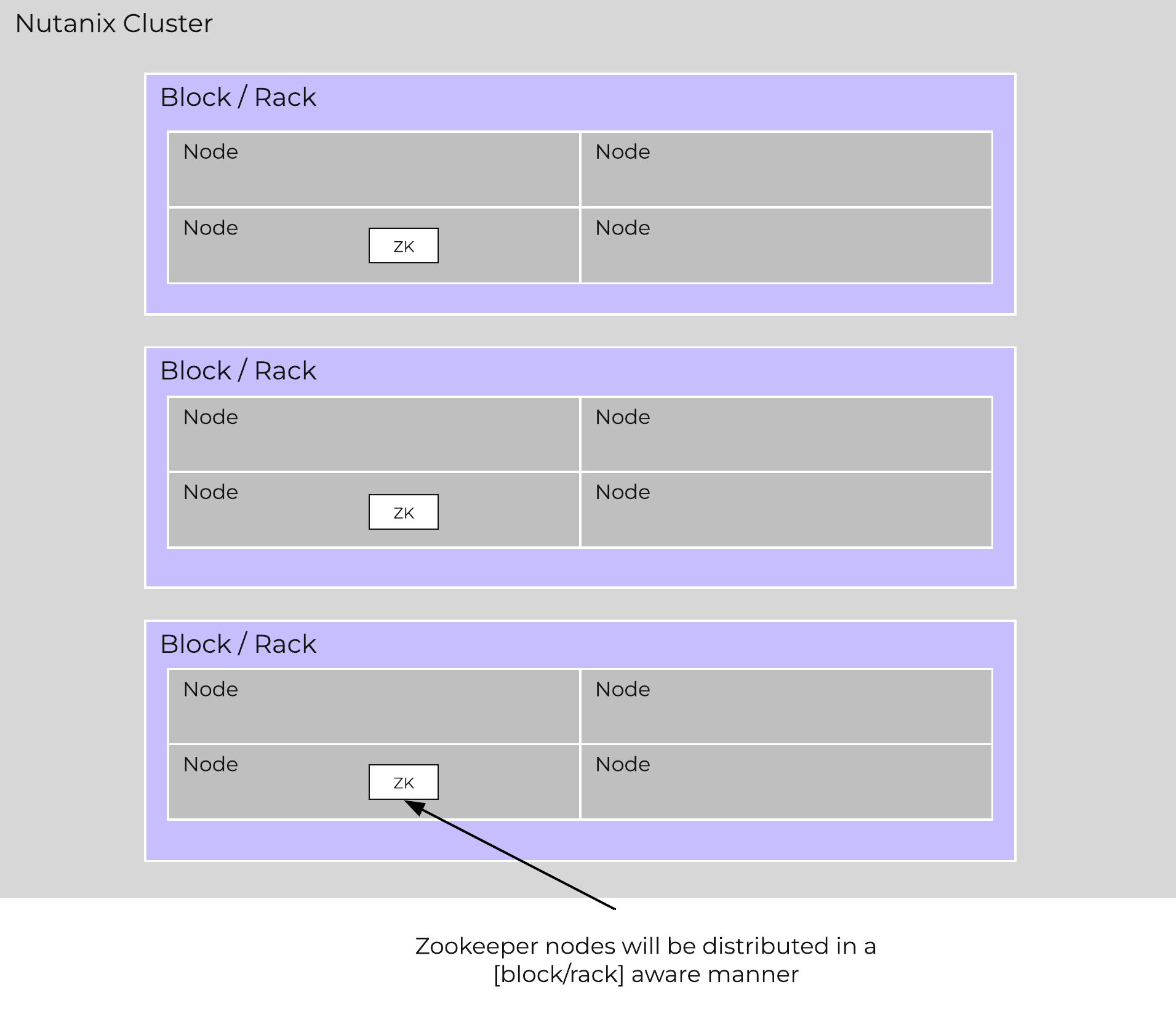 Zookeeper Block/Rack Aware Placement
In the event of a [block/rack] outage, meaning one of the Zookeeper nodes will be gone, the Zookeeper role would be transferred to another node in the cluster as shown below:
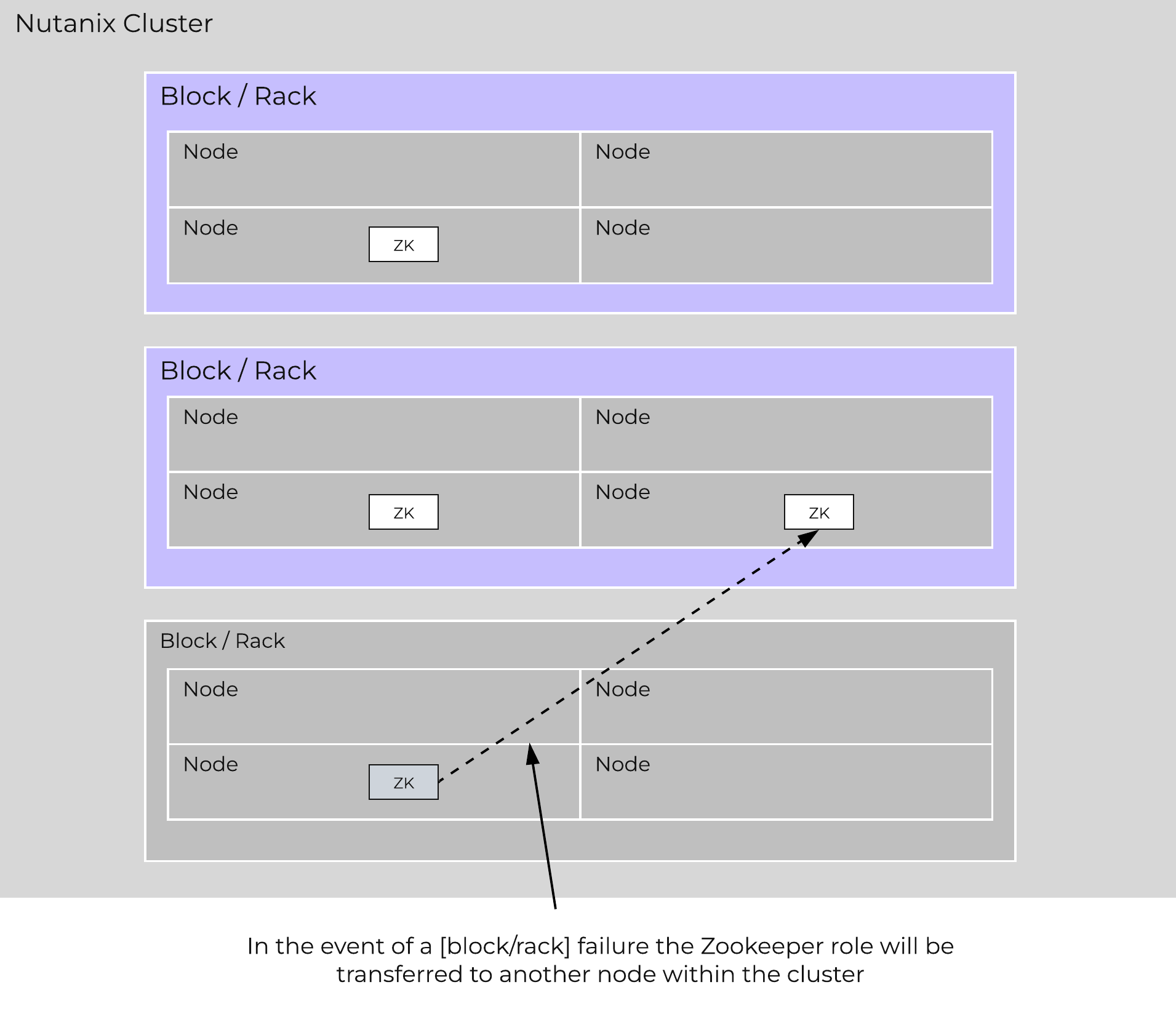 Zookeeper Placement Block/Rack Failure
When the [block/rack] comes back online, the Zookeeper role would be transferred back to maintain [block/rack] awareness.
Reliability and resiliency are key, if not the most important concepts within AOS or any primary storage platform.
Contrary to traditional architectures which are built around the idea that hardware will be reliable, Nutanix takes a different approach: it expects hardware will eventually fail. By doing so, the system is designed to handle these failures in an elegant and non-disruptive manner.
NOTE: That doesn’t mean the hardware quality isn’t there, just a concept shift. The Nutanix hardware and QA teams undergo an exhaustive qualification and vetting process.
As mentioned in the prior sections metadata and data are protected using a RF which is based upon the cluster FT level. As of 5.0 supported FT levels are FT1 and FT2 which correspond to metadata RF3 and data RF2, or metadata RF5 and data RF3 respectively.
To learn more about how metadata is sharded refer to the prior ‘Scalable Metadata’ section. To learn more about how data is protected refer to the prior ‘Data protection’ section.
In a normal state, cluster data layout will look similar to the following:
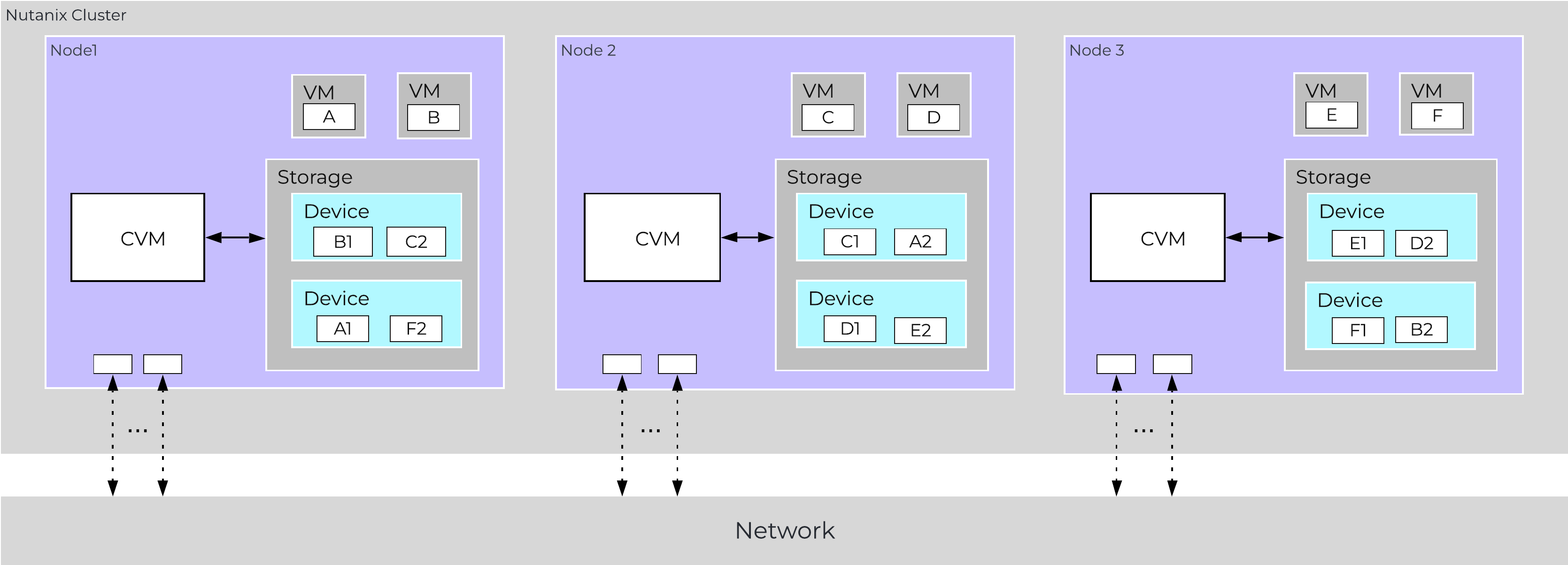 Data Path Resiliency - Normal State
As you can see the VM/vDisk data has 2 or 3 copies on disk which are distributed among the nodes and associated storage devices.
By ensuring metadata and data is distributed across all nodes and all disk devices we can ensure the highest possible performance during normal data ingest and re-protection.
As data is ingested into the system its primary and replica copies will be distributed across the local and all other remote nodes. By doing so we can eliminate any potential hot spots (e.g. a node or disk performing slowly) and ensure a consistent write performance.
In the event of a disk or node failure where data must be re-protected, the full power of the cluster can be used for the rebuild. In this event the scan of metadata (to find out the data on the failed device(s) and where the replicas exist) will be distributed evenly across all CVMs. Once the data replicas have been found all healthy CVMs, disk devices (SSD+HDD), and host network uplinks can be used concurrently to rebuild the data.
For example, in a 4 node cluster where a disk fails each CVM will handle 25% of the metadata scan and data rebuild. In a 10 node cluster, each CVM will handle 10% of the metadata scan and data rebuild. In a 50 node cluster, each CVM will handle 2% of the metadata scan and data rebuild.
Key point: With Nutanix and by ensuring uniform distribution of data we can ensure consistent write performance and far superior re-protection times. This also applies to any cluster wide activity (e.g. erasure coding, compression, deduplication, etc.)
Comparing this to other solutions where HA pairs are used or a single disk holds a full copy of the data, they will face frontend performance issues if the mirrored node/disk is under duress (facing heavy IO or resource constraints).
Also, in the event of a failure where data must be re-protected, they will be limited by a single controller, a single node's disk resources and a single node's network uplinks. When terabytes of data must be re-replicated this will be severely constrained by the local node's disk and network bandwidth, increasing the time the system is in a potential data loss state if another failure occurs.
Being a distributed system, AOS is built to handle component, service, and CVM failures, which can be characterized on a few levels:
When there is an unplanned failure (in some cases we will proactively take things offline if they aren't working correctly) we begin the rebuild process immediately.
Unlike some other vendors which can, depending on the failure, wait up to 60 minutes to start rebuilding and only maintain a single copy during that period (very risky and can lead to data loss if there's any sort of failure), we are not willing to take that risk at the sacrifice of potentially higher storage utilization.
We can do this because of a) the granularity of our metadata b) choose peers for write RF dynamically (while there is a failure, all new data (e.g. new writes / overwrites) maintain their configured redundancy) and c) we can handle things coming back online during a rebuild and re-admit the data once it has been validated. In this scenario data may be "over-replicated" in which a Curator scan will kick off and remove the over-replicated copies.
A disk failure can be characterized as just that, a disk which has either been removed, encounters a failure, or one that is not responding or has I/O errors. When Stargate sees I/O errors or the device fails to respond within a certain threshold it will mark the disk offline. Once that has occurred Hades will run S.M.A.R.T. and check the status of the device. If the tests pass the disk will be marked online, if they fail it will remain offline. If Stargate marks a disk offline multiple times (currently 3 times in an hour), Hades will stop marking the disk online even if S.M.A.R.T. tests pass.
VM impact:
In the event of a disk failure, a Curator scan (MapReduce Framework) will occur immediately. It will scan the metadata (Cassandra) to find the data previously hosted on the failed disk and the nodes / disks hosting the replicas.
Once it has found that data that needs to be “re-replicated”, it will distribute the replication tasks to the nodes throughout the cluster.
During this process a Drive Self Test (DST) is started for the bad disk and SMART logs are monitored for errors.
The following figure shows an example disk failure in node 1, device 1 and re-protection on node 2 and 3:
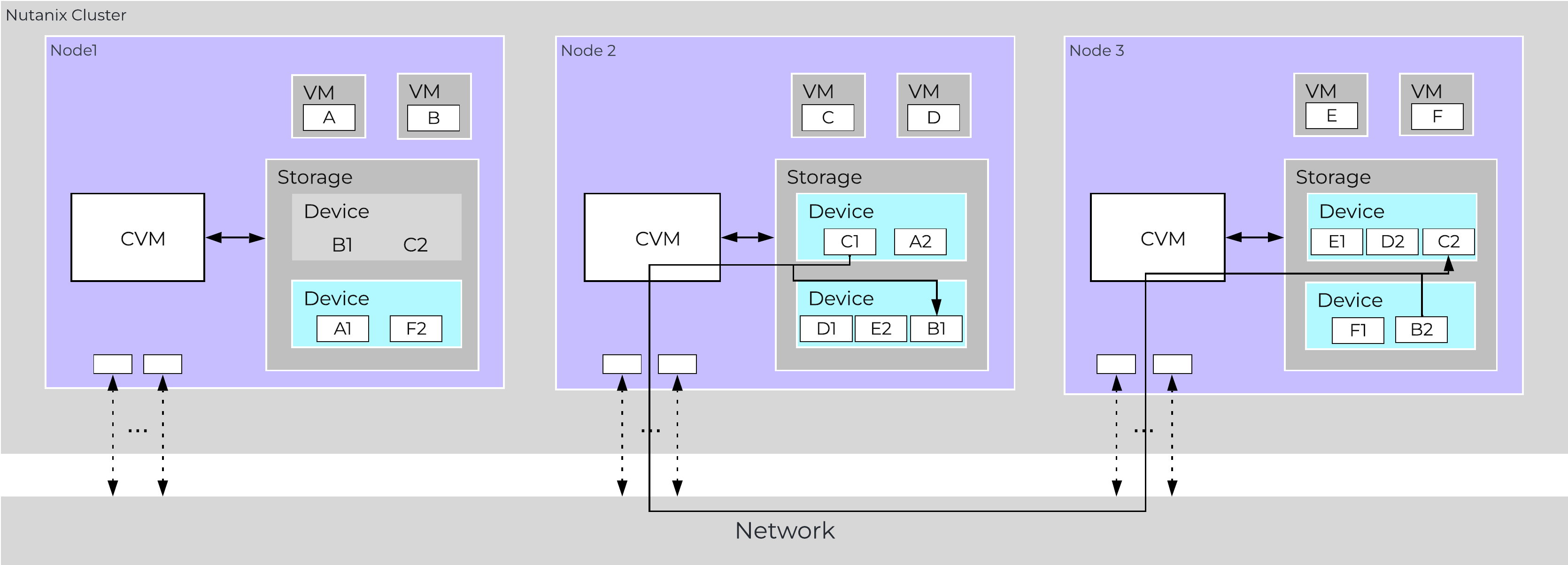 Data Path Resiliency - Node 1 Disk Failure
An important thing to highlight here is given how Nutanix distributes data and replicas across all nodes / CVMs / disks; all nodes / CVMs / disks will participate in the re-replication.
This substantially reduces the time required for re-protection, as the power of the full cluster can be utilized; the larger the cluster, the faster the re-protection.
VM Impact:
In the event of a node failure (node 1 shown below), a VM HA event will occur restarting the VMs on other nodes throughout the virtualization cluster. Once restarted, the VMs will continue to perform I/Os as usual which will be handled by their local CVMs.
Similar to the case of a disk failure above, a Curator scan will find the data previously hosted on the node and its respective replicas. Once the replicas are found all nodes will participate in the reprotection.
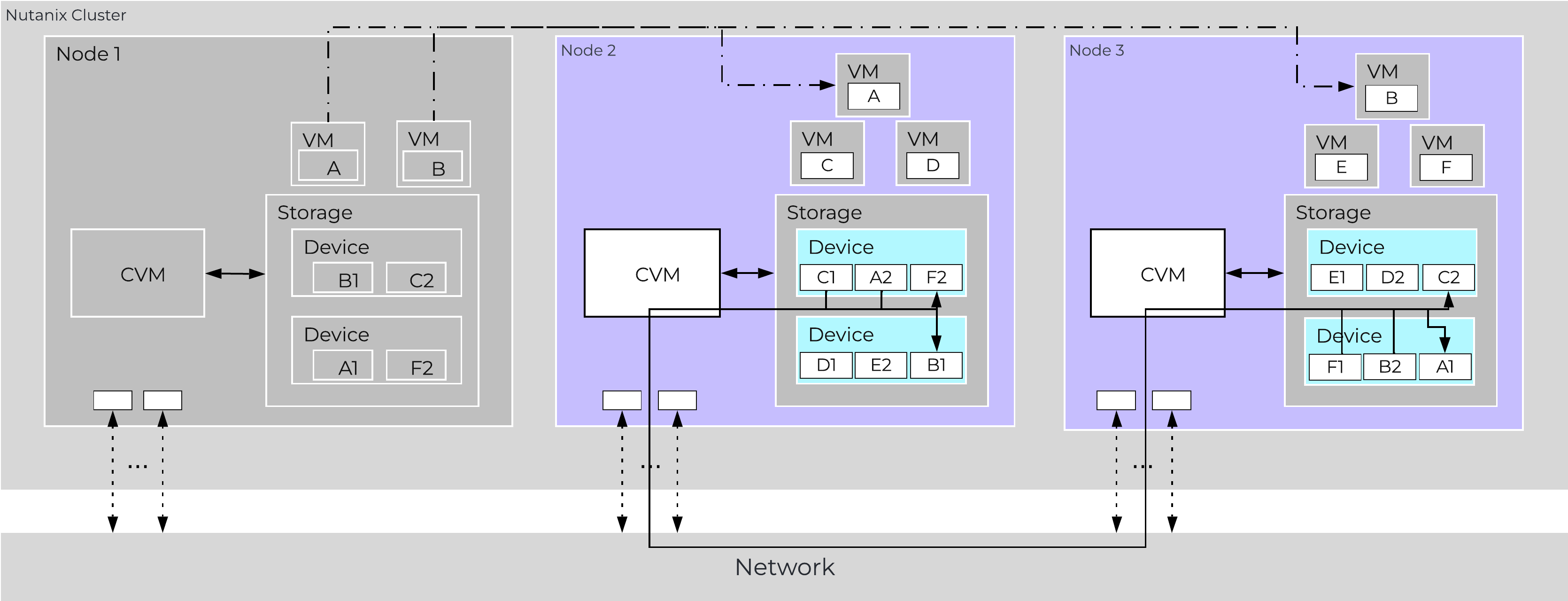 Data Path Resiliency - Node 1 Failure
In the event where the node remains down for a prolonged period of time (30 minutes), the down CVM will be removed from the metadata ring. It will be joined back into the ring after it has been up and stable for a duration of time.
Data resiliency state will be shown in Prism on the dashboard page.
You can also check data resiliency state via the cli:
###### Node Statusncli cluster get-domain-fault-tolerance-status type=node###### Block Status
ncli cluster get-domain-fault-tolerance-status type=rackable_unit
These should always be up to date, however to refresh the data you can kick off a Curator partial scan.
A CVM “failure” can be characterized as a CVM power action causing the CVM to be temporarily unavailable. The system is designed to transparently handle these gracefully. In the event of a failure, I/Os will be re-directed to other CVMs within the cluster. The mechanism for this will vary by hypervisor.
The rolling upgrade process actually leverages this capability as it will upgrade one CVM at a time, iterating through the cluster.
VM impact:
In the event of a CVM “failure” the I/O which was previously being served from the down CVM, will be forwarded to other CVMs throughout the cluster. ESXi and Hyper-V handle this via a process called CVM Autopathing, which leverages HA.py (like “happy”), where it will modify the routes to forward traffic going to the internal address (192.168.5.2) to the external IP of other CVMs throughout the cluster. This enables the datastore to remain intact, just the CVM responsible for serving the I/Os is remote.
Once the local CVM comes back up and is stable, the route would be removed and the local CVM would take over all new I/Os.
In the case of AHV, iSCSI multi-pathing is leveraged where the primary path is the local CVM and the two other paths would be remote. In the event where the primary path fails, one of the other paths will become active.
Similar to Autopathing with ESXi and Hyper-V, when the local CVM comes back online, it’ll take over as the primary path.
Some refresher on terms used:
Resilient capacity is storage capacity in a cluster that can be consumed at the lowest availability/failure domain while maintaining the cluster’s ability to self-heal and recover to desired replication factor (RF) after FT failure(s) at the configured availability/failure domain. So in simple terms, Resilient Capacity = Total Cluster Capacity - Capacity needed to rebuild from FT failure(s).
Homogeneous Cluster Capacity
Non-Homogeneous Cluster Capacity
The resilient capacity in this case is 40TB and not 60TB because after losing the 40TB block, the cluster has node availability domain. At this level to maintain 2 data copies, the capacity available is 40TB which makes resilient capacity in this case to be 40TB overall.
It is recommended to keep clusters uniform and homogenous from capacity and failure domain perspective.
The resilient capacity is displayed within Prism management UI within the storage summary widget (Prism Central via the Clusters view and Prism Element via the Storage view) with a gray line. Thresholds can be set to warn end users when cluster usage is reaching resilient capacity. By default that is set to 75%.
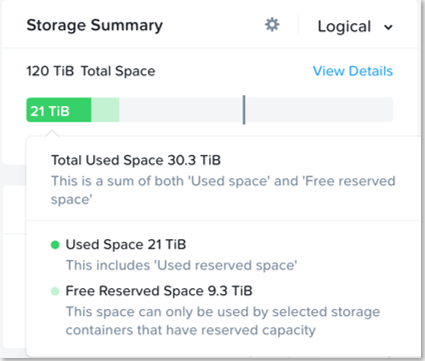
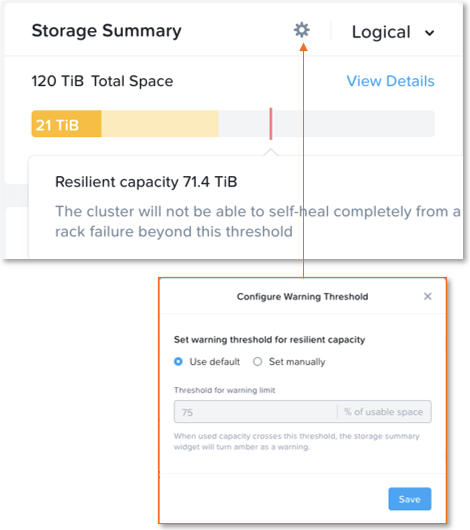
Prism can also show detailed storage utilizations on a per node basis which helps administrators understand resiliency on a per node basis. This is useful in clusters which have a skewed storage distribution.
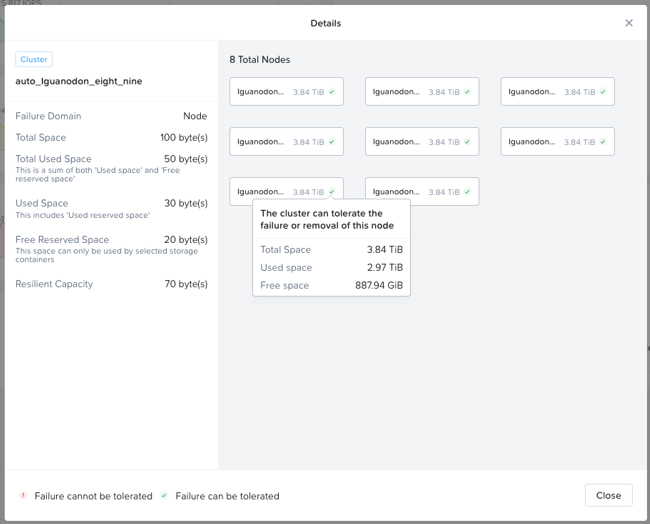
When cluster usage is greater than resilient capacity for that cluster, the cluster might not be able to tolerate and recover from failures anymore. Cluster can possibly still recover and tolerate failure at a lower failure domain as resilient capacity is for configured failure domain. For example, a cluster with a node failure domain may still be able to self-heal and recover from a disk failure but cannot self-heal and recover from a node failure.
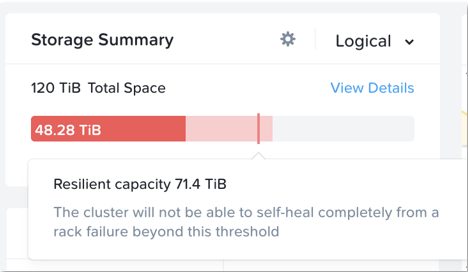
It is highly recommeded to not exceed the resilient capacity of a cluster in any circumstances to ensure proper functioning of cluster and maintain it’s ability to self-heal and recover from failures.
©2025 Nutanix, Inc. All rights reserved. Nutanix, the Nutanix logo and all Nutanix product and service names mentioned are registered trademarks or trademarks of Nutanix, Inc. in the United States and other countries. All other brand names mentioned are for identification purposes only and may be the trademarks of their respective holder(s).