» Download this section as PDF (opens in a new tab/window)
AHV does not leverage a traditional storage stack like ESXi or Hyper-V. All disk(s) are passed to the VM(s) as raw SCSI block devices. This keeps the I/O path lightweight and optimized.
AOS abstracts kvm, virsh, qemu, libvirt, and iSCSI from the end-user and handles all backend configuration. This allows the user to focus higher up the stack on the VMs via Prism / ACLI. The following is for informational purposes only and it is not recommended to manually mess with virsh, libvirt etc.
Each AHV host runs an iSCSI redirector which regularly checks the health of Stargates throughout the cluster using NOP commands.
In the iscsi_redirector log (located in /var/log/ on the AHV host), you can see each Stargate’s health:
2017-08-18 19:25:21,733 - INFO - Portal 192.168.5.254:3261 is up
...
2017-08-18 19:25:25,735 - INFO - Portal 10.3.140.158:3261 is up
2017-08-18 19:25:26,737 - INFO - Portal 10.3.140.153:3261 is up
NOTE: The local Stargate is shown via its 192.168.5.254 internal address.
In the following you can see the iscsi_redirector is listening on 127.0.0.1:3261:
[root@NTNX-BEAST-1 ~]# netstat -tnlp | egrep tcp.*3261
Proto ... Local Address Foreign Address State PID/Program name
...
tcp ... 127.0.0.1:3261 0.0.0.0:* LISTEN 8044/python
...
QEMU is configured with the iSCSI redirector as the iSCSI target portal. Upon a login request, the redirector will perform an iSCSI login redirect to a healthy Stargate (preferably the local one).
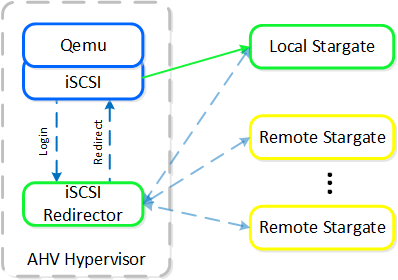 iSCSI Multi-pathing - Normal State
The preferred controller type is virtio-scsi (default for SCSI devices). IDE devices, while possible, are not recommended for most scenarios. In order for virtio to be used with Windows the virtio drivers, Nutanix mobility drivers, or Nutanix guest tools must be installed. Modern Linux distros ship with virtio pre-installed.
In the event where the active Stargate goes down (thus failing to respond to the NOP OUT command), the iSCSI redirector will mark the local Stargate as unhealthy. When QEMU retries the iSCSI login, the redirector will redirect the login to another healthy Stargate.
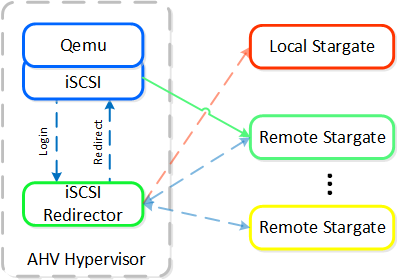 iSCSI Multi-pathing - Local CVM Down
Once the local CVM’s Stargate comes back up (and begins responding to the NOP OUT commands), the remote Stargate will quiesce then kill all connections to remote iSCSI sessions. QEMU will then attempt an iSCSI login again and will be redirected to the local Stargate.
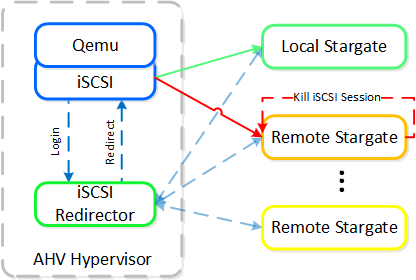 iSCSI Multi-pathing - Local CVM Back Up
Like every hypervisor and OS there is a mix of user and kernel space components which interact to perform a common activity. Prior to reading the following, it is recommended to read the ‘User vs. Kernel Space’ section to learn more about how each interact with each other.
When a VM performs an I/O it will perform the following (some steps have been excluded for clarity):
The following shows this sample flow:
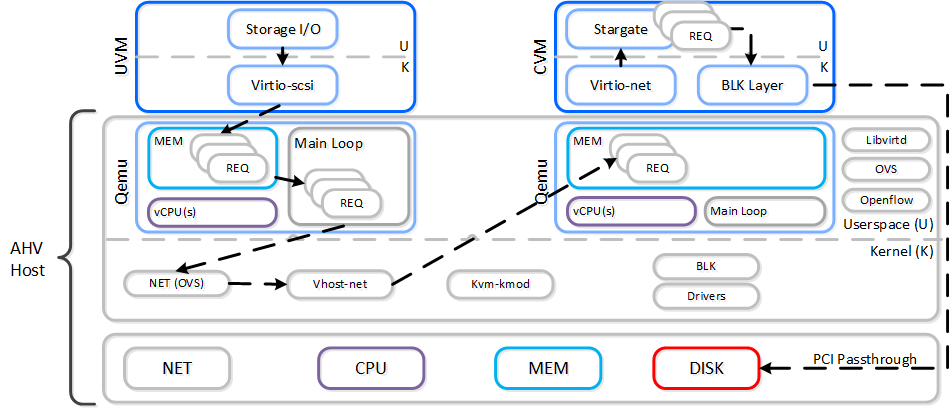 AHV VirtIO Data Path - Classic
Looking at an AHV host, you can see qemu-kvm has established sessions with a healthy Stargate using the local bridge and IPs. For external communication, the external host and Stargate IPs will be used. NOTE: There will be one session per disk device (look at PID 24845)
[root@NTNX-BEAST-1 log]# netstat -np | egrep tcp.*qemu
Proto ... Local Address Foreign Address State PID/Program name
tcp ... 192.168.5.1:50410 192.168.5.254:3261 ESTABLISHED 25293/qemu-kvm
tcp ... 192.168.5.1:50434 192.168.5.254:3261 ESTABLISHED 23198/qemu-kvm
tcp ... 192.168.5.1:50464 192.168.5.254:3261 ESTABLISHED 24845/qemu-kvm
tcp ... 192.168.5.1:50465 192.168.5.254:3261 ESTABLISHED 24845/qemu-kvm
...
Now in this path there are a few inefficiencies as the main loop is single threaded and libiscsi inspects every SCSI command.
As storage technologies continue to evolve and become more efficient, so must we. Given the fact that we fully control AHV and the Nutanix stack this was an area of opportunity.
In short Frodo is a heavily optimized I/O path for AHV that allows for higher throughput, lower latency and less CPU overhead.
Frodo is enabled by default on VMs powered on after AOS 5.5.X.
When a VM performs an I/O it will perform the following (some steps have been excluded for clarity):
The following shows this sample flow:
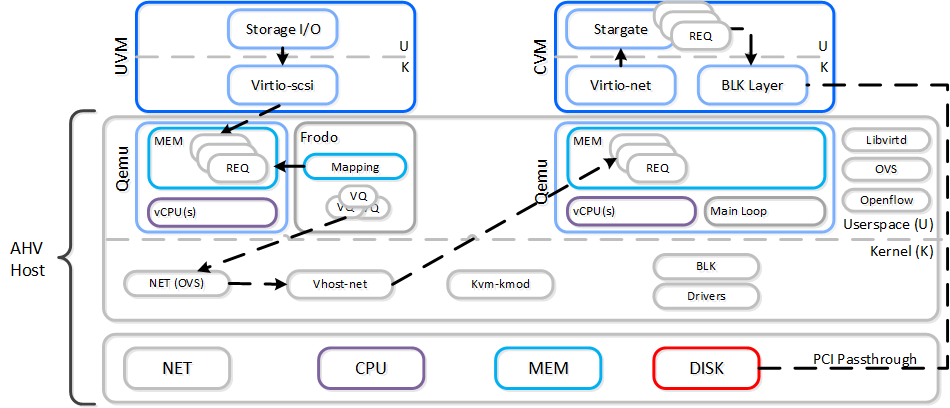 AHV VirtIO Data Path - Frodo
The following path does looks similar to the traditional I/O except for a few key differences:
To the guest it will notice that it now has multiple queues for the disk device(s), other than that it’ll just see the performance improvements. In some cases we’ve seen a CPU overhead reduction of 25% to perform the I/O and performance increases of up to 3x compared to Qemu! Comparing to another hypervisor we’ve seen CPU overhead to perform I/Os drop by up to 3x.
Looking at an AHV host, you will see a frodo process for each VM (qemu-kvm process) running:
[root@drt-itppc03-1 ~]# ps aux | egrep frodo
... /usr/libexec/qemu-kvm ... -chardev socket,id=frodo0,fd=3 \
 -device vhost-user-scsi-pci,chardev=frodo0,num_queues=16...

... /usr/libexec/frodo ... 127.0.0.1:3261 -t iqn.2010-06.com.nutanix:vmdisk...
...
To take advantage of Frodo's multiple threads / connections, you must have >= 2 vCPU for a VM when it is powered on.
It can be characterized by the following:
In the following, you can see Frodo has established sessions with a healthy Stargate using the local bridge and IPs. For external communication, the external host and Stargate IPs will be used.
[root@NTNX-BEAST-1 log]# netstat -np | egrep tcp.*frodo
Proto ... Local Address Foreign Address State PID/Program name
tcp ... 192.168.5.1:39568 192.168.5.254:3261 ESTABLISHED 42957/frodo
tcp ... 192.168.5.1:39538 192.168.5.254:3261 ESTABLISHED 42957/frodo
tcp ... 192.168.5.1:39580 192.168.5.254:3261 ESTABLISHED 42957/frodo
tcp ... 192.168.5.1:39592 192.168.5.254:3261 ESTABLISHED 42957/frodo
...
The Acropolis IP address management (IPAM) solution provides the ability to establish a DHCP scope and assign addresses to VMs. This leverages VXLAN and OpenFlow rules to intercept the DHCP request and respond with a DHCP response.
Here we show an example DHCP request using the Nutanix IPAM solution where the Acropolis Leader is running locally:
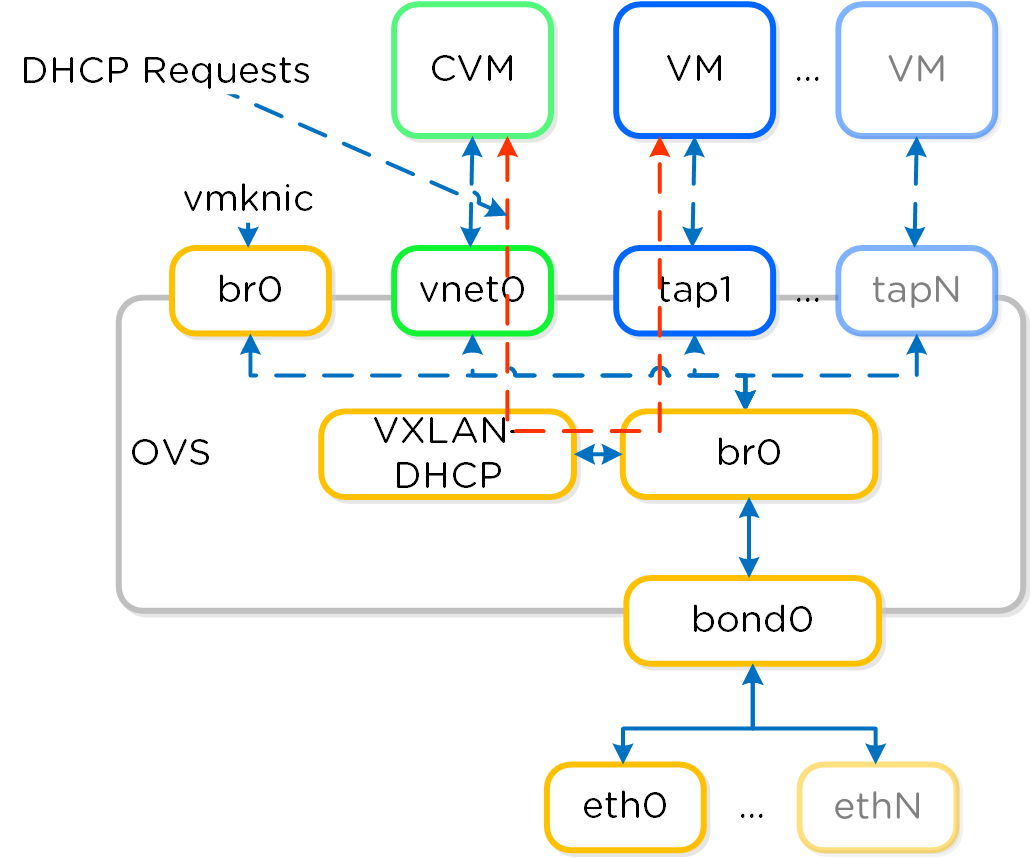 IPAM - Local Acropolis Leader
If the Acropolis Leader is running remotely, the same VXLAN tunnel will be leveraged to handle the request over the network.
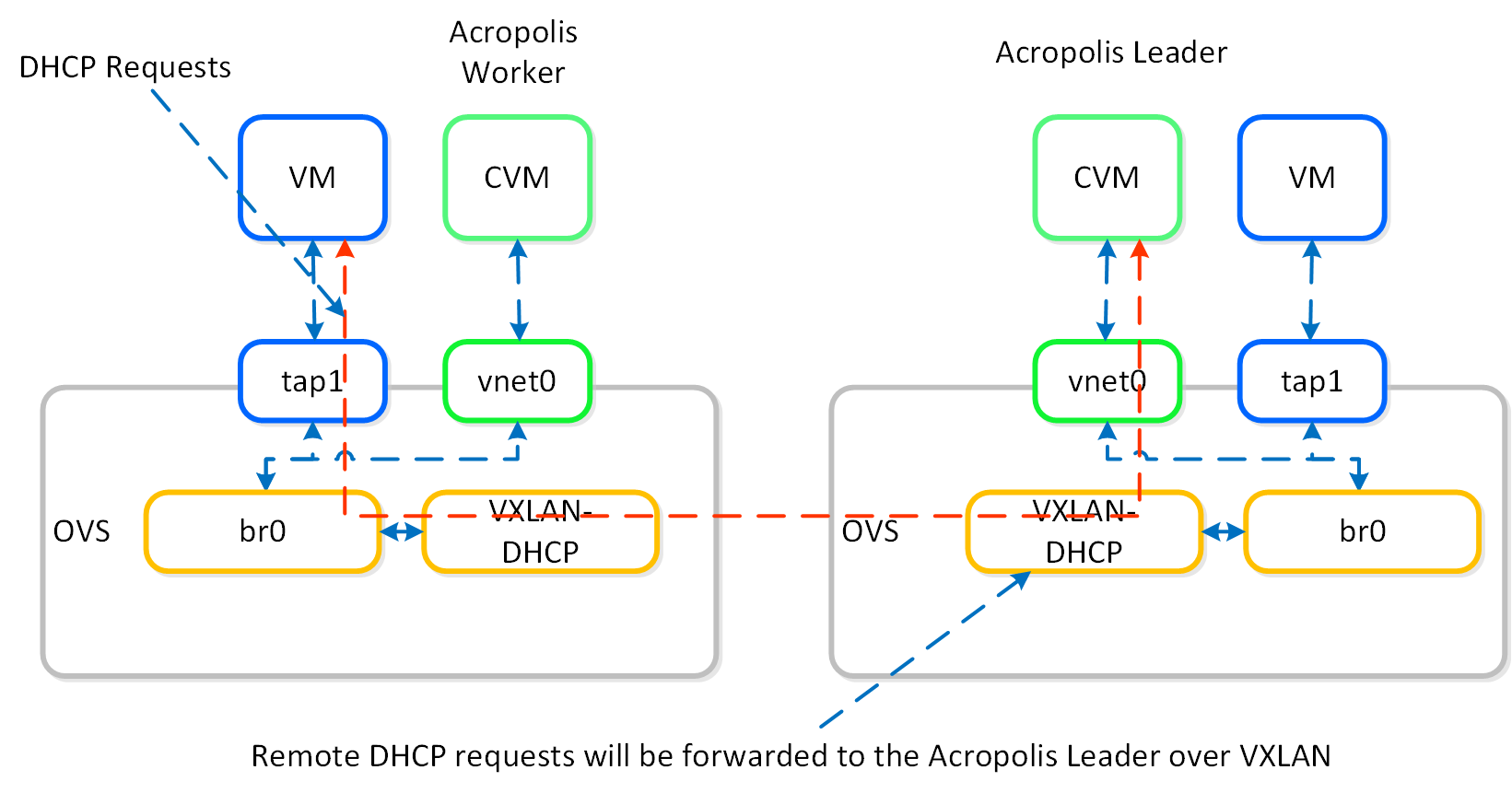 IPAM - Remote Acropolis Leader
Traditional DHCP / IPAM solutions can also be leveraged in an ‘unmanaged’ network scenario.
AHV VM HA is a feature built to ensure VM availability in the event of a host or block outage. In the event of a host failure the VMs previously running on that host will be restarted on other healthy nodes throughout the cluster. The Acropolis Leader is responsible for restarting the VM(s) on the healthy host(s).
The Acropolis Leader tracks host health by monitoring its connections to the libvirt on all cluster hosts:
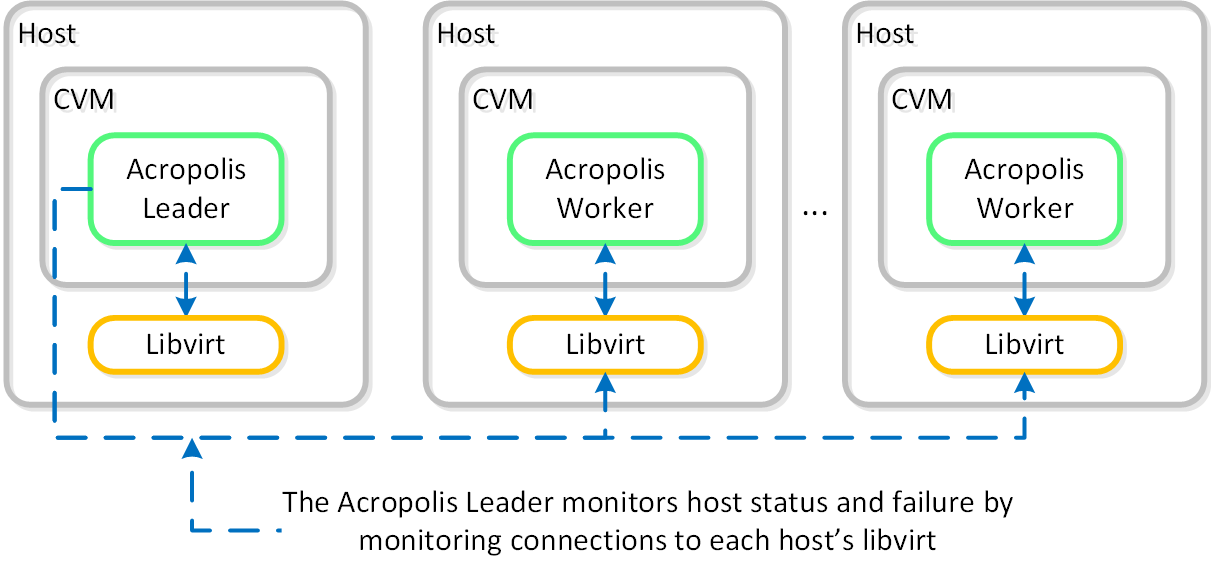 HA - Host Monitoring
Once the libvirt connection goes down, the countdown to the HA restart is initiated. Should libvirt connection fail to be re-established within the timeout, Acropolis will restart VMs that were running on the disconnected host. When this occurs, VMs should be restarted within 120 seconds.
In the event the Acropolis Leader becomes partitioned, isolated or fails a new Acropolis Leader will be elected on the healthy portion of the cluster. If a cluster becomes partitioned (e.g X nodes can’t talk to the other Y nodes) the side with quorum will remain up and VM(s) will be restarted on those hosts.
There are two main modes for VM HA:
When using the Guarantee mode for VM HA, the system will reserve host resources for VMs. The amount of resources which are reserved is summarized by the following:
When hosts have uneven memory capacities the system will use the largest host’s memory capacity when determining how much to reserve per host.
Prior to 5.0, we supported both host and segment based reservations. With 5.0 and later we now only support a segment based reservation which is automatically implemented when the Guarantee HA mode is selected.
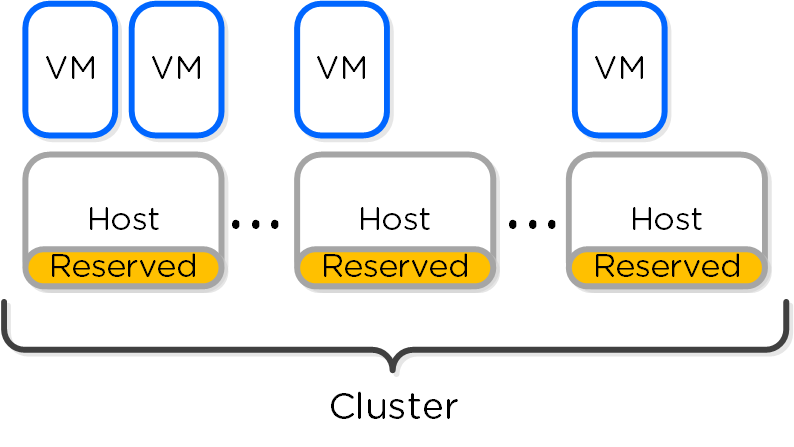
Reserve segments distributes the resource reservation across all hosts in a cluster. In this scenario, each host will share a portion of the reservation for HA. This ensures the overall cluster has enough failover capacity to restart VM(s) in the event of a host failure.
The figure shows an example scenario with reserved segments:
 HA - Reserved Segment
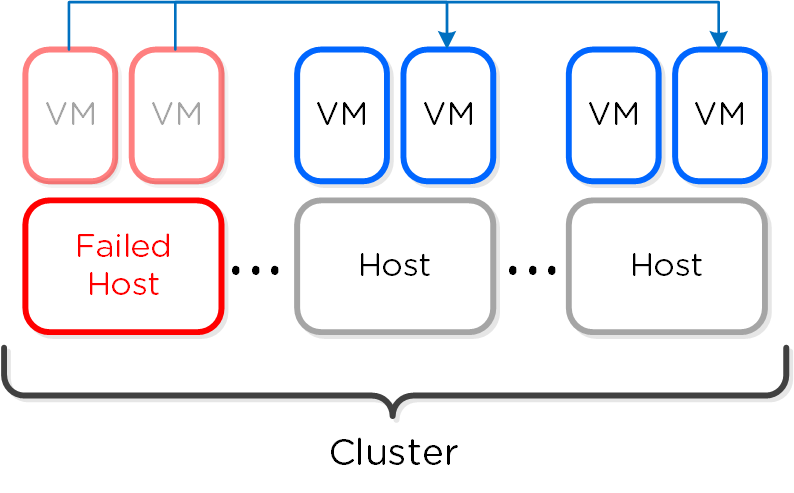
In the event of a host failure VM(s) will be restarted throughout the cluster on the remaining healthy hosts:
 HA - Reserved Segment - Fail Over
The VM high availability Guarantee configuration ensures that every VM in a cluster can restart if an AHV host becomes unavailable. To make this capability possible, VM high availability performs complex calculations every time a VM goes through a start cycle in the cluster. VM high availability Guarantee mode uses segments (setting: kAcropolisHAReserveSegments) when performing these failover calculations. Before it starts a VM, the cluster must ensure the following:
The cluster assigns a VM a parcel, which is a logical unit defining the resources the VM requires to run. A VM parcel takes resources on the AHV host where it’s running and reserves a segment on another AHV host in the cluster for failover purposes. AHV resources that are not used by VM parcels are available for running additional VMs or for failover capacity.
A parcel takes resources away from the AHV host where it runs, but you can map multiple parcels to the same AHV host failover segment if the parcels belong to VMs running on different AHV hosts.
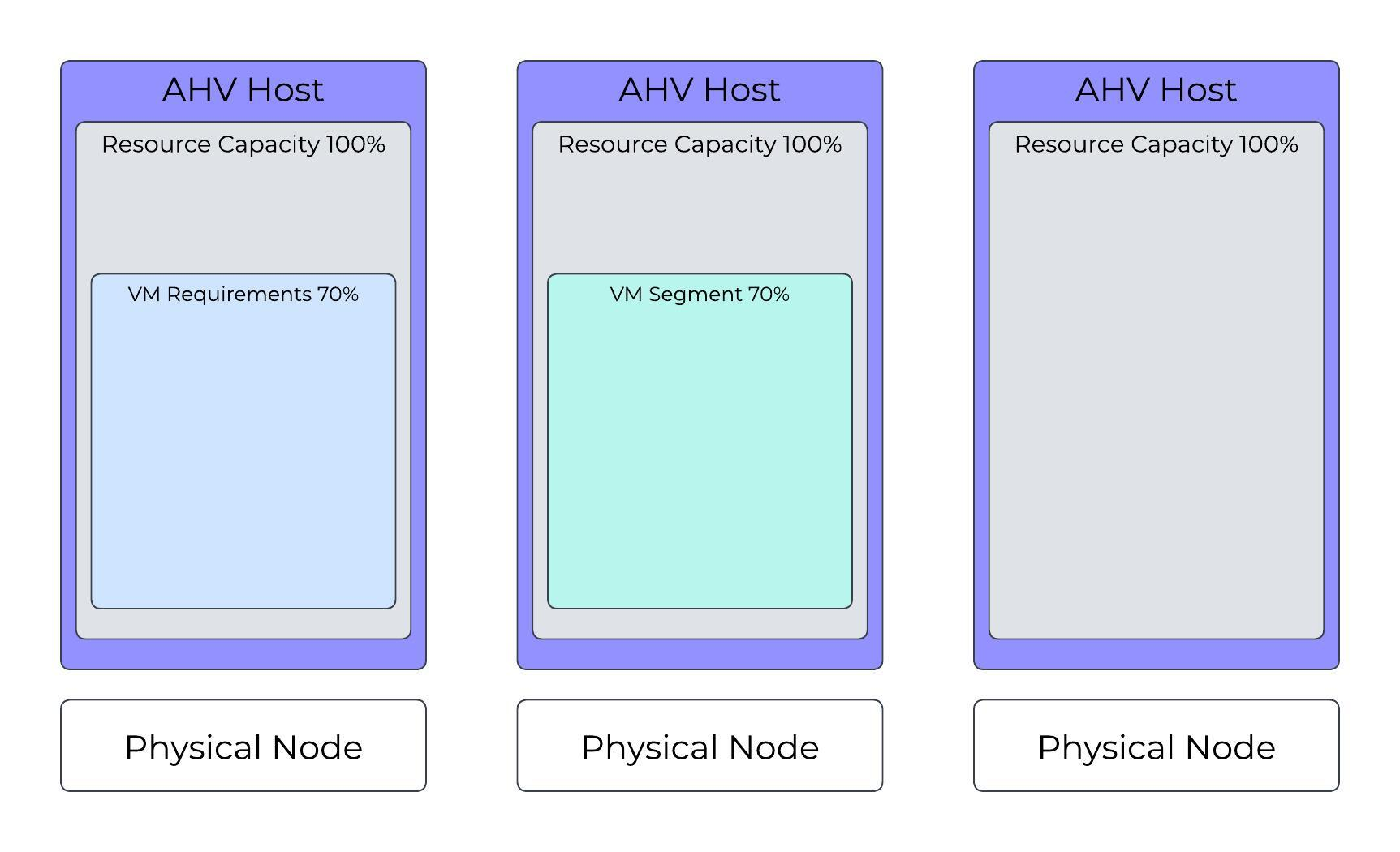
The figures in this section use the following color coding:
These examples assume a three-node cluster where each AHV host has the same amount of memory and can provide the same quantity of resources to run VMs.
Starting a VM (VM01) that uses 70 percent of an AHV host’s resources first takes resources from the AHV host where it’s started (AHV Host 1), then takes a segment of resources from any other AHV host in the cluster to ensure coverage in a failover scenario. In this configuration, VM01 can start when AHV Host 1 is unavailable.
 AHV Cluster: Valid Configuration with One VM Running
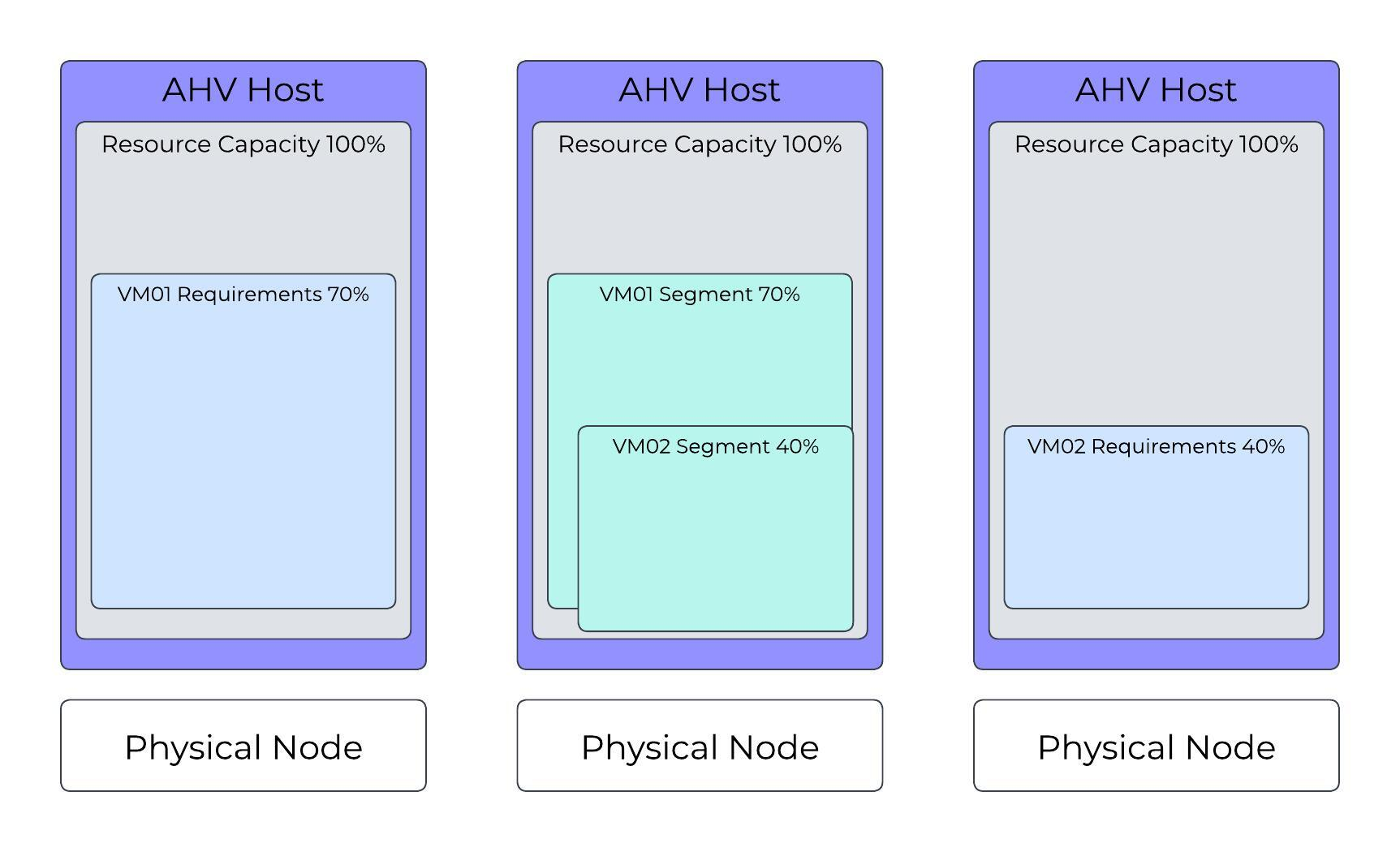
Building on the first scenario, the system requests a start operation for VM02, which uses 40 percent of an AHV host’s resources. In this configuration, AHV Host 3 can run the VM, and AHV Host 2 can provide a segment (failover capacity) for the VM. Remember that you can map multiple segments to the same AHV resources if the segments belong to VMs running on different AHV hosts.
 AHV Cluster: Valid Configuration with Two VMs Running
AHV resources not used by running VMs are available for running additional VMs or for failover capacity. AHV Host 2 has 30 percent of its resources available to run VMs because it must account for the largest segment or group of segments from the same remote AHV host. The cluster can't use AHV resources assigned for failover capacity to run VMs.
Building on the previous two scenarios, the system requests a start operation for VM03, which, like VM02, uses 40 percent of an AHV host’s resources. In this configuration, AHV Host 3 can run the new VM, and AHV Host 2 can provide a segment (failover capacity) for it.
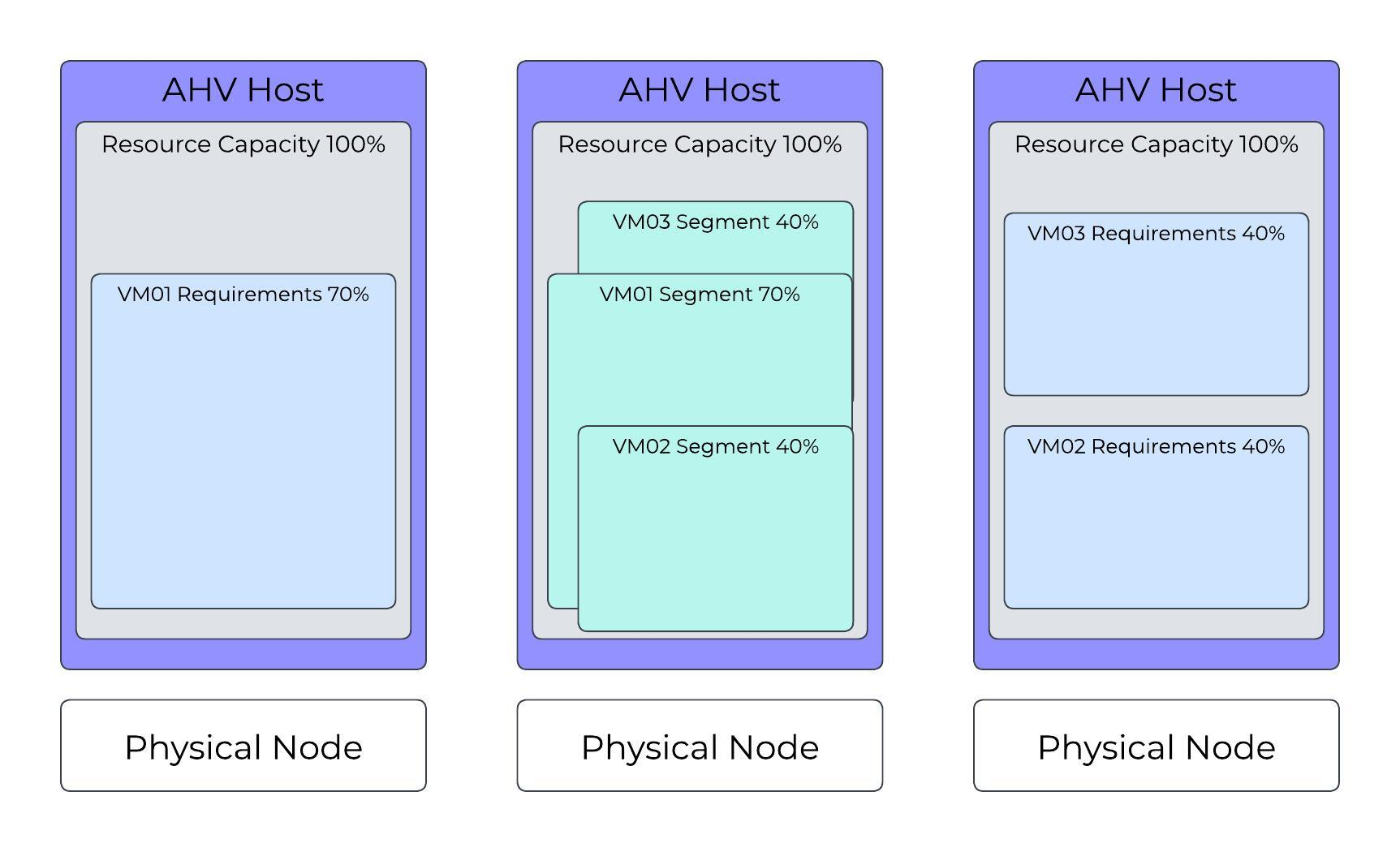 AHV Cluster: Valid Configuration with Three VMs Running
In this scenario, AHV Host 2 now has 20 percent or 30 percent of its resources available for additional failover segments, or only 20 percent for running VMs.
In this scenario, VM02 and VM03, which each use 40 percent of an AHV host’s resources, run on different AHV hosts. The system requests a start operation for VM01, which uses 70 percent of an AHV host’s resources. Although AHV Host 1 can run VM01, the cluster in this configuration doesn’t have enough segments available to provide failover capacity for all VMs if an AHV host becomes unavailable.
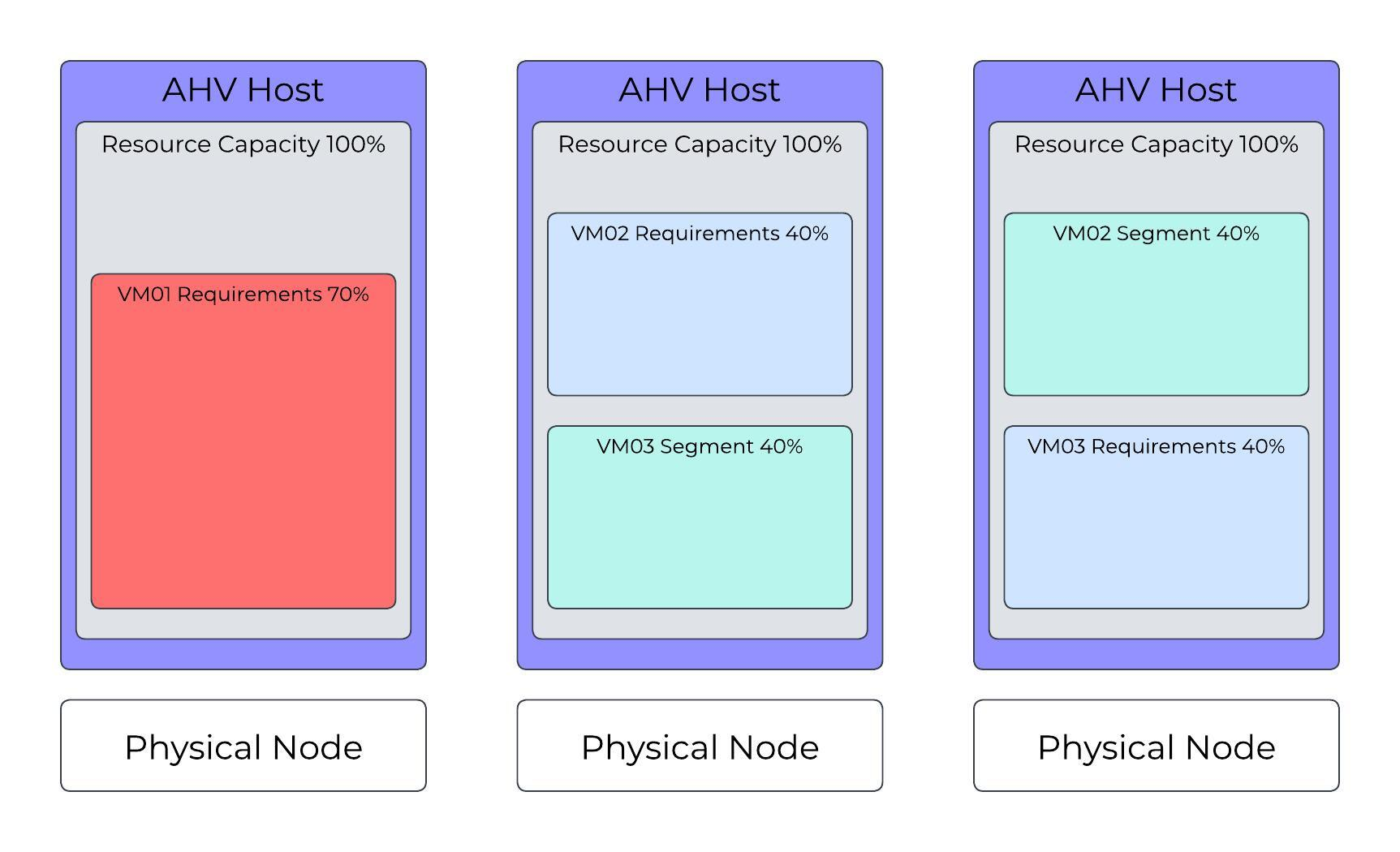 AHV Cluster: Invalid State, Can’t Run VM01
The system will automatically calculate the total number of reserved segments and per host reservation.
Finding reservations reduces to a well known set of problems called Knapsack. The optimal solution is NP-hard (exponential), but heuristic solutions can come close to optimal for the common case. We implement one such algorithm called MTHM. Nutanix will continue improving its placement algorithms.
The VM high availability failure detection mechanism monitors cluster state and triggers actions in the AHV cluster when an AHV host fails. Every CVM runs an Acropolis service. One CVM in the cluster hosts the Acropolis leader, which monitors failures, and the rest of the CVMs host an Acropolis worker. The Acropolis leader issues one communication per second between itself and each AHV host’s libvirtd process. If this communication fails and isn’t reestablished within X seconds, VM high availability initiates a failure process. The number of seconds depends on the failure scenario.
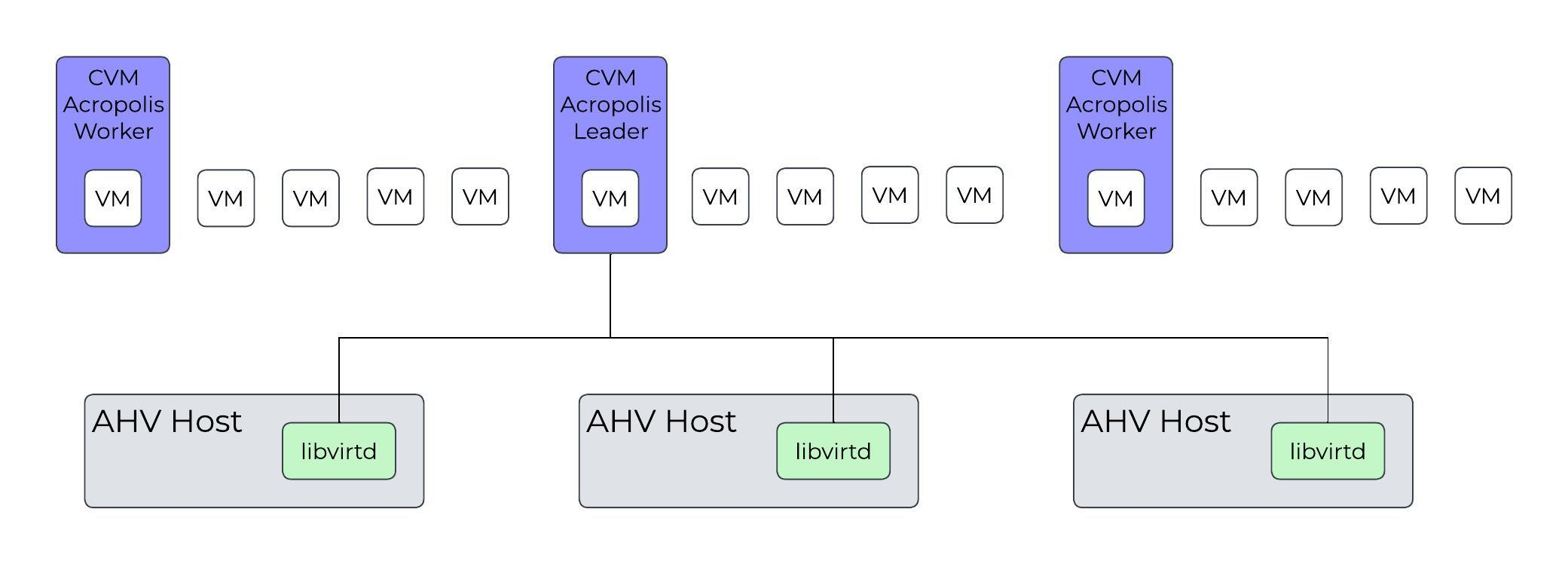 VM High Availability CVM to AHV Host Communication
Nutanix AHV’s failure process provides automatic protection against phantom VMs, so a cluster never has more than one copy of a VM running at any time.
This failure scenario applies when an AHV host or AHV host management process fails.
Table: Remote AHV Host is Unavailable
| Time in Seconds | Description |
|---|---|
| T- | Normal operation: Acropolis leader can complete health checks against all remote AHV hosts’ libvirtd processes successfully. |
| T0 | Acropolis leader loses network connectivity to a remote AHV host’s libvirtd process. |
| T20 | Acropolis leader starts a 40-second timeout. |
| T60 | Acropolis leader instructs all CVM Stargate processes to block I/O from the AHV host that lost connectivity. Acropolis leader waits for all remote CVM Stargate processes to acknowledge the I/O block. |
| T120 | All VMs restart. Acropolis leader distributes the VM start requests to the available AHV hosts. |
The major difference between the previous failure scenario and this scenario is that the network-partitioned AHV host can run VMs. However, because the network-partitioned AHV host can’t access the VMs’ virtual disks, the VMs in the network-partitioned AHV host fail 45 seconds after the first I/O failure. This design ensures that starting the same VMs on other AHV hosts doesn’t lead to multiple copies of the same VM.
Table: Network Partition
| Time in Seconds | Description |
|---|---|
| T- | Normal operation: Acropolis leader can complete health checks against all remote AHV hosts’ libvirtd processes successfully. |
| T0 | Acropolis leader loses network connectivity to a remote AHV host’s libvirtd process. |
| T20 | Acropolis leader starts a 40-second timeout. |
| T60 | Acropolis leader instructs all CVM Stargate processes to block I/O from the AHV host that lost connectivity. Acropolis leader waits for all remote CVM Stargate processes to acknowledge the I/O block. Because all I/O is blocked, the VMs can’t make any progress on T120 the network-partitioned AHV host, so you can continue. The VMs on the network-partitioned AHV host terminate 45 seconds after the first failed I/O request. |
| T120 | All VMs restart. Acropolis leader distributes the VM start requests to the available AHV hosts |
The Acropolis leader can fail in the following situations:
Table: Acropolis Leader Failure
| Time in Seconds | Description |
|---|---|
| T- | Normal operation: Acropolis leader can complete health checks against all remote AHV hosts’ libvirtd processes successfully. |
| T0 | The AHV host running Acropolis leader becomes unavailable. |
| T20 | The remaining available AHV hosts elect a new Acropolis leader. |
| T60 | The new Acropolis leader instructs all CVM Stargate processes to block I/O from the AHV host where the original Acropolis leader ran. Acropolis leader waits for all remote CVM T120 Stargate processes to acknowledge the I/O block. |
| T120 | All VMs restart. Acropolis leader distributes the VM start requests to the available AHV hosts. |
©2025 Nutanix, Inc. All rights reserved. Nutanix, the Nutanix logo and all Nutanix product and service names mentioned are registered trademarks or trademarks of Nutanix, Inc. in the United States and other countries. All other brand names mentioned are for identification purposes only and may be the trademarks of their respective holder(s).