» Download this section as PDF (opens in a new tab/window)
The Nutanix platform incorporates a wide range of storage optimization technologies that work in concert to make efficient use of available capacity for any workload. These technologies are intelligent and adaptive to workload characteristics, eliminating the need for manual configuration and fine-tuning.
The following optimizations are leveraged:
More detail on how each of these features can be found in the following sections.
The table describes which optimizations are applicable to workloads at a high-level:
| Data Transform | Best suited Application(s) | Comments |
|---|---|---|
| Erasure Coding (EC-X) | Most, Ideal for Nutanix Files/Objects | Provides higher availability with reduced overheads than traditional RF. No impact to normal write or read I/O performance. Does have some read overhead in the case of a disk / node / block failure where data must be decoded. Not suitable for workloads that are write or overwrite intensive, such as VDI |
| Inline Compression |
All | No impact to random I/O, helps increase storage tier utilization. Benefits large or sequential I/O performance by reducing data to replicate and read from disk. |
| Offline Compression |
None | Given inline compression will compress only large or sequential writes inline and do random or small I/Os post-process, that should be used instead. |
| Dedupe | Full Clones in VDI, Persistent Desktops, P2V/V2V, Hyper-V (ODX) | Greater overall efficiency for data which wasn't cloned or created using efficient AOS clones |
The Nutanix platform leverages a replication factor (RF) for data protection and availability. This method provides the highest degree of availability because it does not require reading from more than one storage location or data re-computation on failure. However, this does come at the cost of storage resources as full copies are required.
To provide a balance between availability while reducing the amount of storage required, AOS provides the ability to encode data using erasure codes (EC).
Similar to the concept of RAID (levels 4, 5, 6, etc.) where parity is calculated, EC encodes a strip of data blocks on different nodes and calculates parity. In the event of a host and/or disk failure, the parity can be leveraged to calculate any missing data blocks (decoding). In the case of AOS, the data block is an extent group. Based upon the read nature of the data (read cold vs. read hot), the system will determine placement of the blocks in the strip.
For data that is read cold, we will prefer to distribute the data blocks from the same vDisk across nodes to form the strip (same-vDisk strip). This simplifies garbage collection (GC) as the full strip can be removed in the event the vDisk is deleted. For read hot data we will prefer to keep the vDisk data blocks local to the node and compose the strip with data from different vDisks (cross-vDisk strip). This minimizes remote reads as the local vDisk’s data blocks can be local and other VMs/vDisks can compose the other data blocks in the strip. In the event a read cold strip becomes hot, AOS will try to recompute the strip and localize the data blocks.
The number of data and parity blocks in a strip is configurable based upon the desired failures to tolerate. The configuration is commonly referred to as the number of <number of data blocks>/<number of parity blocks>.
For example, “RF2 like” availability (N+1) could consist of 3 or 4 data blocks and 1 parity block in a strip (3/1 or 4/1). “RF3 like” availability (N+2) could consist of 3 or 4 data blocks and 2 parity blocks in a strip (3/2 or 4/2). The default strip sizes are 4/1 for RF2 like availability and 4/2 for RF3 like availability. These can be overriden using nCLI is desired.
ncli container [create/edit] ... erasure-code=<N>/<K>
where N is number of data blocks and K is number of parity blocks
EC can place data and parity blocks in a block aware manner. If there are enough blocks (strip size (k+n) + 1) available in the cluster AOS will look to build block aware EC strips.
The expected overhead can be calculated as <# parity blocks> / <# data blocks>. For example, a 4/1 strip has a 25% overhead or 1.25X compared to the 2X of RF2. A 4/2 strip has a 50% overhead or 1.5X compared to the 3X of RF3.
The following table characterizes the encoded strip sizes and example overheads:
| FT1 (RF2 equiv.) | FT2 (RF3 equiv.) | |||
|---|---|---|---|---|
| Cluster Size (nodes) |
EC Strip Size (data/parity blocks) |
EC Overhead (vs. 2X of RF2) |
EC Strip Size (data/parity) |
EC Overhead (vs. 3X of RF3) |
| 4 | 2/1 | 1.5X | N/A | N/A |
| 5 | 3/1 | 1.33X | N/A | N/A |
| 6 | 4/1 | 1.25X | 2/2 | 2X |
| 7 | 4/1 | 1.25X | 3/2 | 1.6X |
| 8+ | 4/1 | 1.25X | 4/2 | 1.5X |
It is always recommended to have a cluster size which has at least 1 more node (or block for block aware data / parity placement) than the combined strip size (data + parity) to allow for rebuilding of the strips in the event of a node or block failure. This eliminates any computation overhead on reads once the strips have been rebuilt (automated via Curator). For example, a 4/1 strip should have at least 6 nodes in the cluster for a node aware EC strip or 6 blocks for a block aware EC strip. The previous table follows this best practice.
The encoding is done post-process and leverages the Curator MapReduce framework for task distribution. Since this is a post-process framework, the traditional write I/O path is unaffected.
A normal environment using RF would look like the following:
 Typical AOS RF Data Layout
In this scenario, we have RF2 data whose primary copies are local and replicas are distributed to other nodes throughout the cluster.
When a Curator full scan runs, it will find eligible extent groups which are available to become encoded. Eligible extent groups must be “write-cold” meaning they haven’t been written to for awhile. This is controlled with the following Curator Gflag: curator_erasure_code_threshold_seconds. After the eligible candidates are found, the encoding tasks will be distributed and throttled via Chronos.
The following figure shows an example 3/1 strip:
 AOS Encoded Strip - Pre-savings
Once the data has been successfully encoded (strips and parity calculation), the replica extent groups are then removed.
The following figure shows the environment after EC has run with the storage savings:
 AOS Encoded Strip - Post-savings
Nutanix also supports inline erasure coding, which can be enabled on containers using nCLI. Inline erasure coding encodes and creates coding strips inline by erasure coding the data without waiting for it to become write-cold. In inline erasure coding, the erasure coded strips are created on the same vDisk data by default. There is also an option to create strips from cross vdisks, preserving data locality if that is desired. Inline erasure coding is only recommended for workloads that do not require data locality or do not perform numerous overwrites. For example, Nutanix Objects is a workload typically well suited for inline erasure coding and has inline EC-X turned on by default. Because the Objects architecture treats overwrites as new writes, it aligns naturally with inline erasure coding data at ingest.
Note that when inline erasure coding is enabled, a post-process policy is available as a fallback. This provides optionality so that if the data ingest or frontend data operations are too high, it can fall back to post-process.
Nutanix is a platform of enterprise services, one such service is Nutanix Unified Storage (NUS) supporting our File and Object services. Starting in AOS 7.3 and later to support the growing storage demands of File and Object deployments on Nutanix, erasure coding can now support up to 12/2 strip sizes. This is only available on dedicated clusters running NUS. Increasing the strip width allows the platform to store a greater ratio of data to parity blocks, improving efficiency and enabling more optimal distribution across a larger number of nodes. This increased strip width also results in better capacity utilization, especially in clusters with high density requirements, such as file and object clusters.
Erasure Coding pairs perfectly with inline compression which will add to the storage savings.
For a visual explanation, you can watch the following video: LINK
The Nutanix Capacity Optimization Engine (COE) is responsible for performing data transformations to increase data efficiency on disk. Currently compression is one of the key features of the COE to perform data optimization. AOS provides both inline and post-process compression to best suit the customer’s needs and type of data. Inline compression is enabled by default when a storage container is created.
Inline compression will compress sequential streams of data or large I/O sizes (>64K) when written to the Extent Store (SSD + HDD). This includes data draining from OpLog as well as sequential data skipping it.
The OpLog will compress all incoming writes >4K that show good compression (Gflag: vdisk_distributed_oplog_enable_compression). This will allow for a more efficient utilization of the OpLog capacity and help drive sustained performance.
When drained from OpLog to the Extent Store the data will be decompressed, aligned and then re-compressed at a 32K aligned unit size.
This feature is on by default and no user configuration is necessary.
Offline compression will initially write the data as normal (in an un-compressed state) and then leverage the Curator framework to compress the data cluster wide. When inline compression is enabled but the I/Os are random in nature, the data will be written un-compressed in the OpLog, coalesced, and then compressed in memory before being written to the Extent Store.
Nutanix leverages LZ4 and LZ4HC for data compression. Normal data will be compressed using LZ4, which provides a very good blend between compression and performance. For cold data, LZ4HC will be leveraged to provide an improved compression ratio.
Cold data is characterized into two main categories:
The following figure shows an example of how inline compression interacts with the AOS write I/O path:
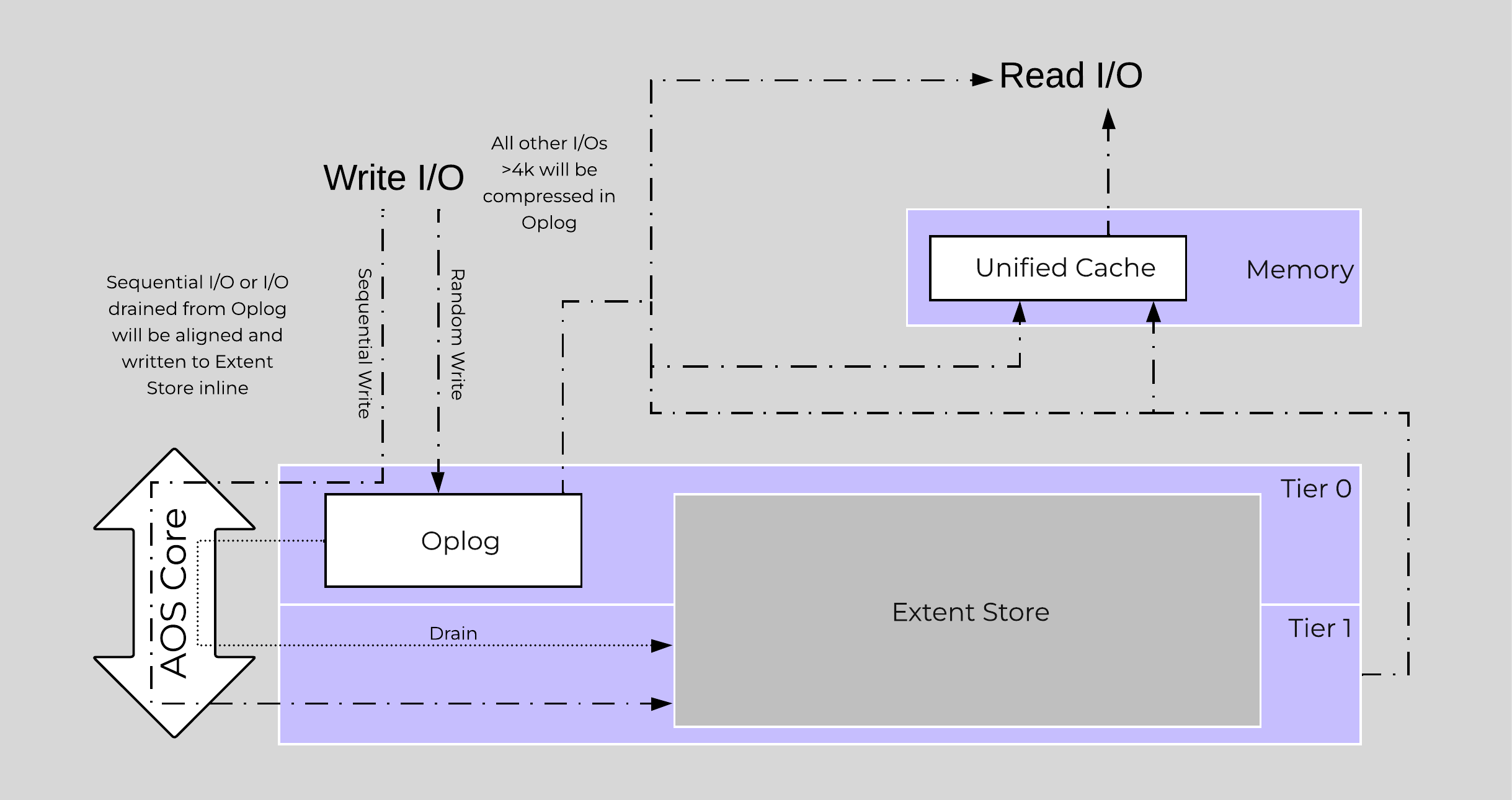 Inline Compression I/O Path
Almost always use inline compression (compression delay = 0) as it will only compress larger / sequential writes and not impact random write performance.
This will also increase the usable size of the SSD tier increasing effective performance and allowing more data to sit in the SSD tier. Also, for larger or sequential data that is written and compressed inline, the replication for RF will be shipping the compressed data, further increasing performance since it is sending less data across the wire.
Inline compression also pairs perfectly with erasure coding.
For offline compression, all new write I/O is written in an un-compressed state and follows the normal AOS I/O path. After the compression delay (configurable) is met, the data is eligible to become compressed. Compression can occur anywhere in the Extent Store. Offline compression uses the Curator MapReduce framework and all nodes will perform compression tasks. Compression tasks will be throttled by Chronos.
The following figure shows an example of how offline compression interacts with the AOS write I/O path:
 Offline Compression I/O Path
For read I/O, the data is first decompressed in memory and then the I/O is served.
You can view the current compression rates via Prism on the Storage > Dashboard page.
For a visual explanation, you can watch the following video: LINK
The Elastic Dedupe Engine is a software-based feature of AOS which allows for data deduplication in the capacity (Extent Store) tiers. Streams of data are fingerprinted during ingest at a 16KB granularity (Controlled by: stargate_dedup_fingerprint) within a 1MB extent. Prior to AOS 5.11, AOS used only SHA-1 hash to fingerprint and identify candidates for dedupe. AOS now uses logical checksums to select candidates for dedupe. This fingerprint is only done on data ingest and is then stored persistently as part of the written block’s metadata.
Contrary to traditional approaches which utilize background scans requiring the data to be re-read, Nutanix performs the fingerprint inline on ingest. For duplicate data that can be deduplicated in the capacity tier, the data does not need to be scanned or re-read, essentially duplicate copies can be removed.
To make the metadata overhead more efficient, fingerprint refcounts are monitored to track dedupability. Fingerprints with low refcounts will be discarded to minimize the metadata overhead. To minimize fragmentation full extents will be preferred for deduplication.
Use deduplication on your base images (you can manually fingerprint them using vdisk_manipulator) to take advantage of the unified cache.
Fingerprinting is done during data ingest of data with an I/O size of 64K or greater (initial I/O or when draining from OpLog). AOS then looks at hashes/fingerprints of each 16KB chunk within a 1MB extent and if it finds duplicates for more than 40% of chunks, it dedupes the entire extent. That resulted in many dedupe extents with reference count of 1 (no other duplicates) within the 1MB extent from the remaining 60% of extent, that ended up using metadata.
With AOS 6.6, the algorithm was further enhanced such that within a 1MB extent, only chunks that have duplicates will be marked for deduplication instead of entire extent reducing the metadata required. With AOS 6.6, changes were also made with the way dedupe metadata was stored. Before AOS 6.6, dedupe metadata was stored in a top level vdisk block map which resulted in dedupe metadata to be copied when snapshots were taken. This resulted in a metadata bloat. With AOS 6.6, that metadata is now stored in extent group id map which is a level lower than vdisk block map. Now when snapshots are taken of the vdisk, it does not result in copying of dedupe metadata and prevents metadata bloat. Once the fingerprintng is done, a background process will remove the duplicate data using the AOS MapReduce framework (Curator). For data that is being read, the data will be pulled into the AOS Unified Cache which is a multi-tier/pool cache. Any subsequent requests for data having the same fingerprint will be pulled directly from the cache. To learn more about the Unified Cache and pool structure, please refer to the Unified Cache sub-section in the I/O path overview.
The following figure shows an example of how the Elastic Dedupe Engine interacts with the AOS I/O path:
 EDE I/O Path
You can view the current deduplication rates via Prism on the Storage > Dashboard page.
©2025 Nutanix, Inc. All rights reserved. Nutanix, the Nutanix logo and all Nutanix product and service names mentioned are registered trademarks or trademarks of Nutanix, Inc. in the United States and other countries. All other brand names mentioned are for identification purposes only and may be the trademarks of their respective holder(s).