» Download this section as PDF (opens in a new tab/window)
The Nutanix Government Cloud Clusters (GC2) solution meets the stringent security and compliance requirements of government and highly regulated enterprises deploying hybrid cloud infrastructure on bare-metal Amazon Web Services (AWS). Unlike the traditional Nutanix Cloud Clusters (NC2) architecture, which requires you to add AWS credentials and maintain continuous outbound connectivity to Nutanix software as a service (SaaS) endpoints, GC2 places complete control within the AWS environment. You retain full ownership of your AWS credentials, eliminate external dependencies, and operate your Nutanix clusters entirely within your own virtual private cloud (VPC), addressing the core security and sovereignty concerns that prevent adoption in government cloud environments.
The solution is applicable to the configurations below (list may be incomplete, refer to documentation for a fully supported list):
Core Use Case(s):
Management interfaces(s):
AWS Console - AWS Management
Not every instance type is available in every region. The GovCloud regions offer the full list; the European Sovereign Cloud region offers a subset. Check the region and instance table in the GC2 on AWS Deployment and User Guide before you size a cluster.
Cluster sizing:
Upgrades:
Compatible Features:
The following key items are used throughout this section and defined in the following:
The GC2 architecture shifts orchestration intelligence from the NC2 console directly into Prism Element running in your cluster. Cluster provisioning uses AWS CloudFormation templates that use precreated network configurations, enabling flexible deployment into government cloud regions while maintaining strict network isolation. Day 2 operations run entirely within your environment: cluster expansion, shrink, and node replacement through the Infra-Manager CLI on the CVMs, and AOS and Prism Central upgrades through Life Cycle Manager in Prism Central. Sensitive workloads never expose credentials or operational telemetry beyond your boundaries.
In the standard Nutanix Cloud Clusters (NC2) model, you extend permissions to the NC2 SaaS service to provision clusters on your behalf, and it provisions all the necessary cloud infrastructure. After you deploy the infrastructure, Nutanix deploys agents to the Controller VMs (CVMs) to synchronize with the NC2 console through outbound internet connectivity. This architecture relies on three critical agents working together:
Host agent
The host agent continuously gathers telemetry on hardware health, network status, storage conditions, and system performance, emitting regular heartbeats back to the NC2 console for centralized monitoring.
Clusters agent
The clusters agent is a conduit between the NC2 console and local infrastructure, listening for orchestration intents issued by the NC2 console, verifying their authenticity, and forwarding them to the appropriate local services for implementation.
Infrastructure gateway
The infrastructure gateway translates these high-level intents into actionable AWS API calls to provision Elastic Compute Cloud (EC2) instances, configure networking, manage storage attachments, hibernate nodes, and perform cluster scaling operations.
While this architecture works effectively for most enterprise deployments, it presents challenges for government cloud environments. Extending AWS permissions to the NC2 console to act on behalf of the customer and maintaining persistent outbound connectivity to external endpoints violates fundamental security principles mandated by government compliance frameworks that demand complete data sovereignty and zero-trust network architectures. Highly regulated industries can’t permit their infrastructure credentials to leave their controlled environments, nor can they allow continuous telemetry streams to external commercial software as a service (SaaS) platforms. These security constraints led Nutanix to develop Government Cloud Clusters (GC2), where all orchestration intelligence moves from the NC2 console to Prism Element, running entirely within your AWS virtual private cloud (VPC) to eliminate credential sharing and external connectivity requirements while preserving full operational capabilities
The new infrastructure manager in the GC2 service assumes the role previously held by the NC2 console as the intent generator, while the infrastructure gateway continues as the engine. By colocating both services in the private environment, GC2 preserves all the operational capabilities of NC2 while delivering a secure and autonomous experience that meets government cloud requirements.
The infrastructure manager uses a leader-based design with Zookeeper maintaining leadership across CVMs, ensuring high availability and fault tolerance. Every CVM runs an infrastructure manager instance, but only one node actively processes user inputs and generates intents at any given time. If the leader node fails, the remaining infrastructure manager instances automatically elect a new leader and resume operations without manual intervention, guaranteeing continuous cluster management capabilities even during node failures.
The primary operational relationship in GC2 exists between the infrastructure manager and infrastructure gateway. When you initiate an operation through the command-line interface (CLI), the infrastructure manager validates the input, performs preflight checks such as instance type compatibility, constructs a standardized intent, and invokes infrastructure gateway APIs to perform necessary Prism Element cluster operations. The infrastructure manager also directly interacts with AWS APIs to manage cloud infrastructure tasks like provisioning Elastic Compute Cloud (EC2) instances, eliminating the need to share credentials with external platforms.
The following shows a high-level overview of the GC2 Communication in an AWS VPC :
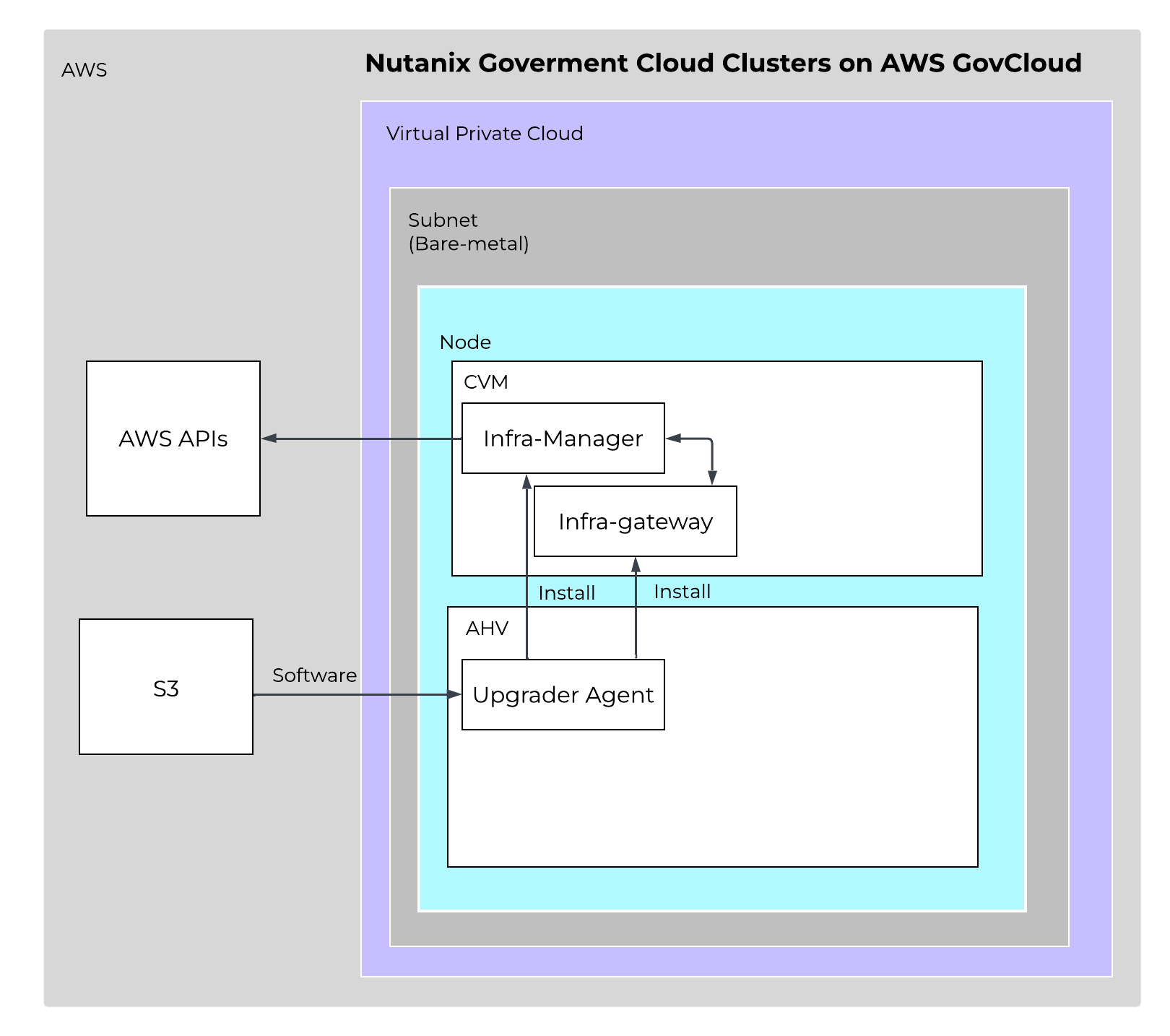 GC2 Agents - Overview
This clear separation of responsibilities creates a streamlined and resilient pipeline from user request to cluster state change. The infrastructure manager handles orchestration logic and cloud resource management, while the infrastructure gateway focuses exclusively on implementing cluster-level changes in Prism Element. Zookeeper-backed state persistence provides fault tolerance and automatic recovery in the event of failures, maintaining operational continuity without requiring external intervention or connectivity.
GC2 deploys through a set of CloudFormation templates, and each template needs specific AWS Identity and Access Management (IAM) permissions to create and manage its resources. By default, every resource template creates the IAM roles it needs inline, in the same stack. A standard deployment therefore requires no separate IAM step, and this remains the default behavior.
Some environments do not allow the person performing the deployment to create, pass, or assume IAM roles. For those environments, GC2 separates IAM permissions into optional, dedicated IAM templates that an account administrator runs ahead of time. The administrator reviews and precreates the required roles under least-privilege policies, hands back the role ARNs, and a separate operator then performs the deployment using only the permissions they hold. Nutanix does not modify any IAM role under this approach. Permissions and credentials stay yours, and you manage them from the AWS IAM console.
Two IAM templates cover the split:
The least-privilege permissions each template needs, covering CloudFormation, IAM, EC2, S3, Lambda, EventBridge, and KMS actions, are documented per template in the deployment guide. Grant only the permissions that the administrator or operator responsible for each stack actually needs.
GC2 stores deployment artifacts and cluster resources in Amazon S3 buckets. Where encryption of data at rest must sit under your control, those buckets can be encrypted with AWS Key Management Service (KMS), including with a customer-managed key (CMK).
You enable it by supplying the ARN of your KMS key as a parameter when you deploy the installer template. The same key value flows into the installer IAM template when you precreate IAM separately, so the generated policies scope to that specific key rather than to all keys in the account. The installer template includes a custom resource that updates the KMS key policy automatically when you supply the key ARN, adding a tag-scoped statement that lets the GC2 roles decrypt and generate data keys through S3. If your security posture prohibits automated key policy changes, or the key lives in a separate centralized AWS account, you add that statement to the key policy yourself.
KMS encryption applies to both deployment and upgrades. With a customer-managed key you keep full ownership of the key, its rotation schedule, and its access policy. Omit the parameter and the buckets use default S3 encryption.
Node lifecycle operations run from the Infra-Manager, a CLI-based, distributed, leader-based orchestration service present on every CVM in the cluster. You sign in to a CVM, start the inframanager client, and issue the operation:
addnode expands the cluster, up to four nodes per command.removenode shrinks it, also up to four nodes per command, by node count or by an explicit list of node IDs.removefailednodes clears nodes that were provisioned but never joined the cluster, and cleans up the cloud resources behind them.replacenode replaces a node, including nodes flagged as pending AWS maintenance.getstatus and getnodes report on the request and on the resulting cluster membership.Software updates are separate. You track and manage the software versions of every entity in the cluster through Life Cycle Manager, and you upgrade AOS and Prism Central in your GC2 environment using LCM. One difference from on-premises is worth knowing before you go looking for it: LCM firmware upgrades for hardware components such as BMC and BIOS do not apply to clusters running on AWS, so LCM does not list those items in the upgrade inventory.
Nutanix integration with the Amazon Web Services (AWS) networking stack means that every VM deployed on Government Cloud Clusters (GC2) on AWS receives a native AWS IP address when using native networking, so that applications have full access to all AWS resources as soon as you migrate or create them on GC2 on AWS. Network performance remains high because the Nutanix network capabilities are directly on top of the AWS overlay, and resource consumption is low because you don’t need additional network components.
AHV uses Open vSwitch (OVS) for all VM networking. You can configure VM networking through Prism or the AOS command-line interface (aCLI), and each virtual network interface card (vNIC) connects to a tap interface. Native networking uses the same networking stack as on-premises. The AHV host, VMs, and physical interfaces use ports to connect to the bridges, and both bridges communicate with the AWS overlay network. Each host has the required drivers to use the AWS overlay network.
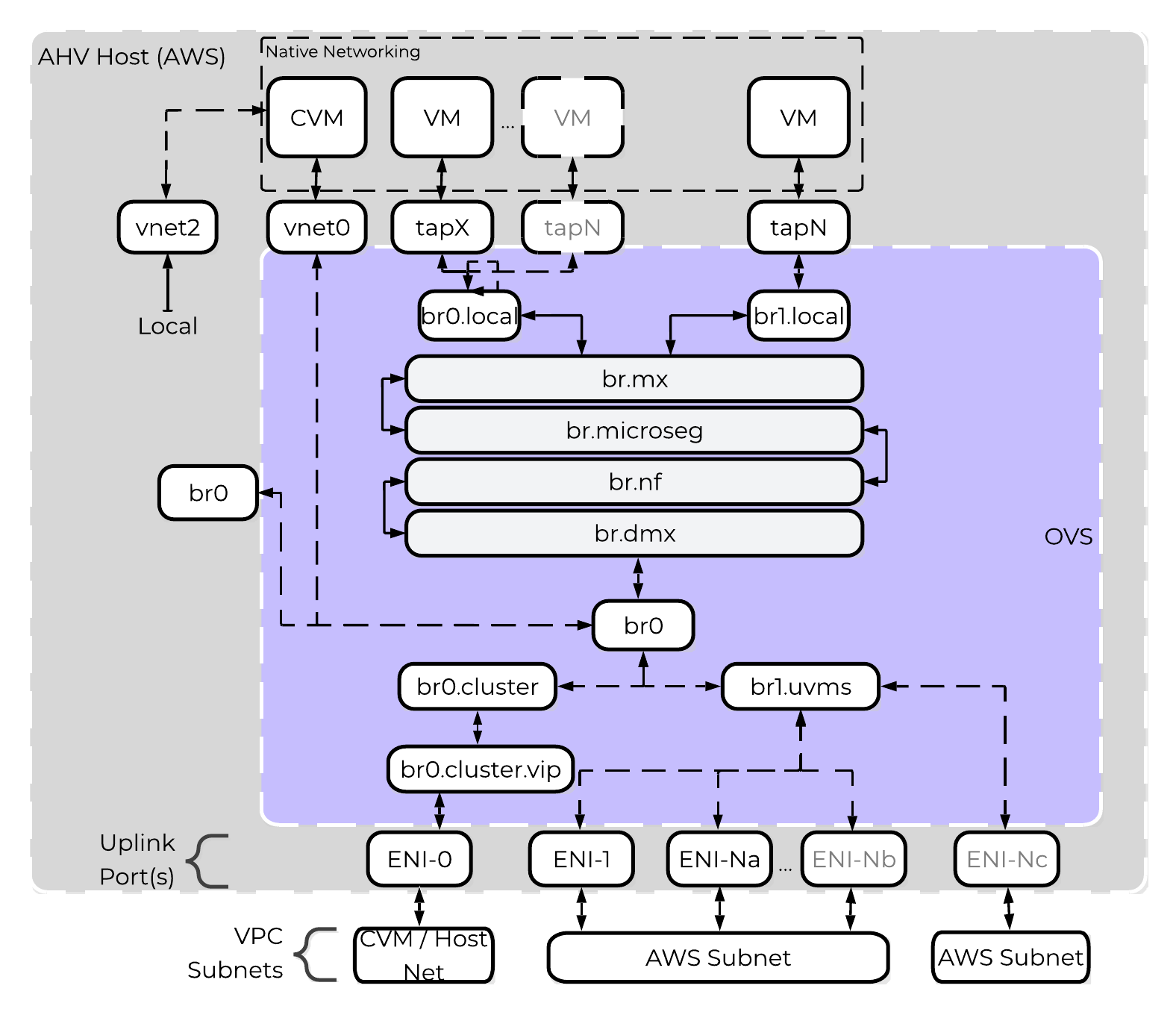 GC2 on AWS - OVS Architecture
Nutanix uses native AWS API calls to deploy AOS on bare-metal Elastic Compute Cloud (EC2) instances and consume network resources. Each bare-metal EC2 instance has full access to its bandwidth through an elastic network interface (ENI), so if you deploy Nutanix to an i7i.metal instance, each node has access to up to 100 Gbps. An ENI is a logical networking component in a VPC that represents a virtual network card, and each ENI can have one primary IP address and up to 49 secondary IP addresses. AWS hosts can support up to 15 ENIs.
When deployed with GC2 on AWS, AHV runs the Cloud Network Controller service on each node as a leaderless service and runs an OpenFlow controller. Cloud Network Controller uses an internal service called Cloud Port Manager to create and delete ENIs and assign ENI IP addresses to guest VMs.
Cloud Port Manager can map large Classless Inter-Domain Routing (CIDR) ranges from AWS and allows AHV to consume all or a subset of the range. If you use an AWS subnet of 10.0.0.0/24 and then create an AHV subnet of 10.0.0.0/24, Cloud Port Manager uses 1 ENI (cloud port) until active VMs consume all of the secondary IP addresses. When the 49 secondary IP addresses are used, Cloud Port Manager attaches an additional ENI to the host and repeats the process. Because each new subnet uses a different ENI on the host, this process can lead to ENI exhaustion if you use many AWS subnets for your deployment.
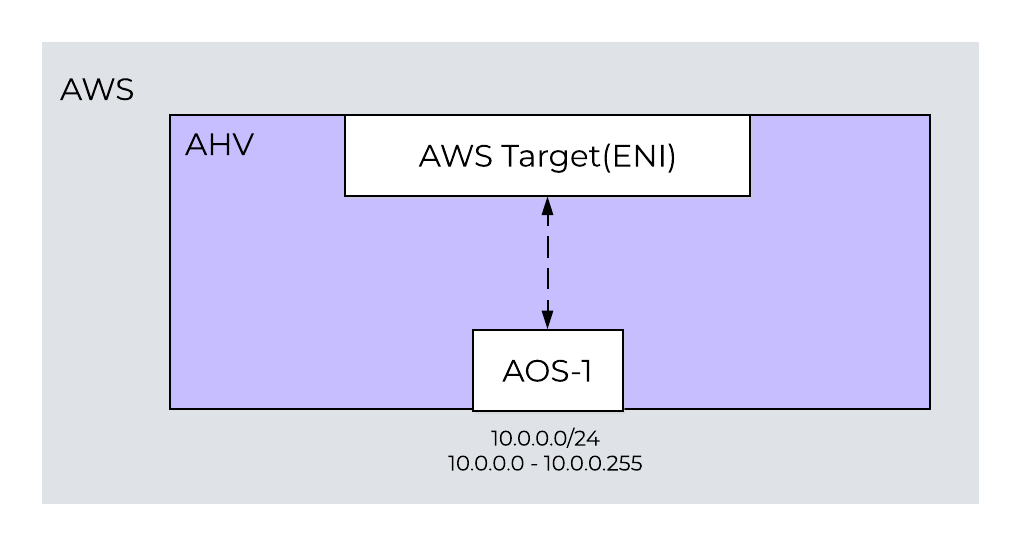 One-to-One Nutanix AHV and AWS Subnet Mapping
To prevent ENI exhaustion, use an AWS subnet of 10.0.2.0/23 as your AWS target. In AHV, create two subnets of 10.0.2.0/24 and 10.0.3.0/24. With this configuration, Cloud Port Manager maps the AHV subnets to one ENI, and you can use many subnets without exhausting the bare-metal nodes’ ENIs. Because a GC2 cluster can have multiple AWS subnets if enough ENIs are available, you can dedicate ENIs to any subnet for more throughput.
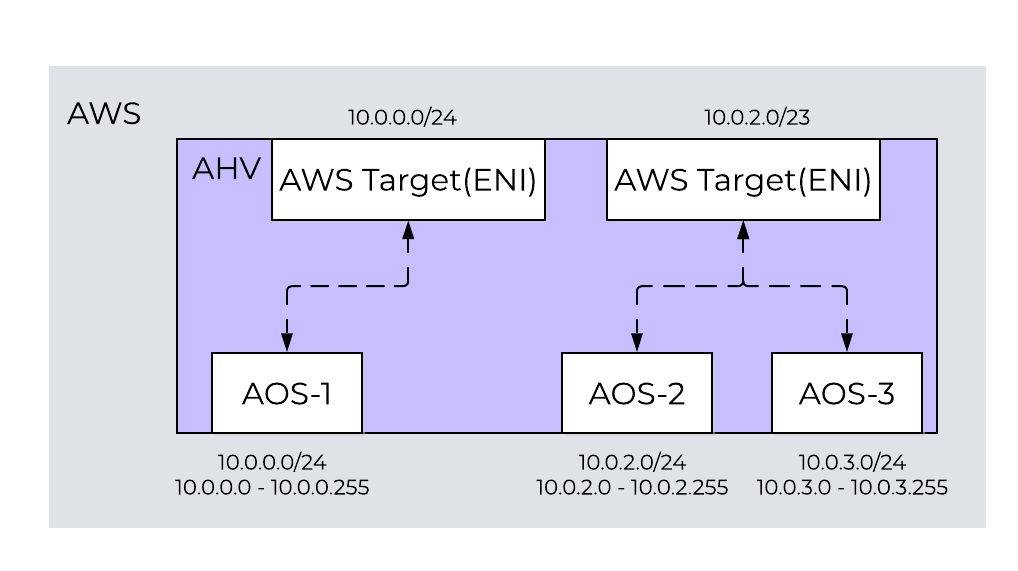 One-to-One and One-to-Many Nutanix AHV and AWS Subnet Mapping
When you consume multiple AHV subnets in a large AWS CIDR range, the network controller generates an Address Resolution Protocol (ARP) request for the AWS default gateway with the ENI address as the source. After the AWS default gateway responds, the network controller installs ARP proxy flows for all AHV subnets with active VMs on the ENI (cloud port). The ARP requests to a network’s default gateway reach the proxy flow and receive the media access control (MAC) address of the AWS gateway in response. This configuration allows traffic to enter and exit the cluster, and it configures OVS flow rules to ensure traffic enters and exits on the correct ENI. For more information on the Nutanix implementation of OVS, see the AHV Administration Guide.
GC2 on AWS creates a single default security group for guest VMs running in the Nutanix cluster. Any ENIs created to support guest VMs are members of this default security group, which allows all guest VMs in a cluster to communicate with each other.
From the AWS VPC dashboard, click on ‘subnets’ then click on ‘Create Subnet’ and input the network details:
An AWS Region is a distinct geographic area. Each Region has multiple, isolated locations known as Availability Zones (AZs), which are logical datacenters available for any AWS customer in that Region to use. Each AZ in a Region has redundant and separate power, networking, and connectivity to reduce the likelihood of two AZs failing simultaneously.
Create a subnet in AWS in a VPC, then connect it to AOS in Prism Element. Cloud network, a new service in the CVM, works with AOS configuration and assigns a VLAN ID (or VLAN tag) to the AWS subnet and fetches relevant details about the subnet from AWS. The network service prevents you from using the AHV or CVM subnet for guest VMs by not allowing you to create a network with the same subnet.
You can use each ENI to manage 49 secondary IP addresses. A new ENI is also created for each subnet that you use. The AHV host, VMs, and physical interfaces use ports to connect to the bridges, and both bridges communicate with the AWS overlay network. Because each host already has the drivers that it needs for a successful deployment, you don’t need to do any additional work to use the AWS overlay network.
Always keep the following best practices in mind:
Don’t share AWS guest-VM subnets between clusters.
Have separate subnets for management (AHV and CVM) and guest VMs.
If you plan to use VPC peering, use nondefault subnets to ensure uniqueness across AWS Regions.
Divide your VPC network range evenly across all usable AZs in a Region.
In each AZ, create one subnet for each group of hosts that has unique routing requirements (for example, public versus private routing).
Size your VPC CIDR and subnets to support significant growth.
AHV uses IP address management (IPAM) to integrate with native AWS networking. GC2 on AWS uses the native AHV IPAM to inform the AWS DHCP server of all IP address assignments using API calls. GC2 relies on AWS to send gratuitous Address Resolution Protocol (ARP) packets for any additions to an ENI’s secondary IP addresses. We rely on these packets to ensure that each hypervisor host is notified when an IP address moves or new IP addresses become reachable. For guest VMs, you can’t share a given AWS subnet between two GC2 on AWS deployments. You can, however, use the same management subnet (AHV and CVMs) for multiple clusters.
The cloud network controller, a service in the AHV host, helps with ENI creation. The cloud network controller runs an OpenFlow controller, which manages the OVS in the AHV hosts and handles mapping, unmapping, and migrating guest-VM secondary IP addresses between ENIs or hosts. A subcomponent of the cloud network controller called cloud port manager provides the interface and manages AWS ENIs.
IPAM avoids address overlap by sending AWS API calls to inform AWS which addresses are being used.
The AOS leader assigns an IP address from the address pool when it creates a managed vNIC, and it releases the address back to the pool when the vNIC or VM is deleted.
GC2 supports asynchronous replication for disaster recovery between two Nutanix clusters over native networking. That includes GC2 to GC2 and GC2 to on-premises, so you can build a DR site in a government cloud region without maintaining a second physical datacenter, and you can tier recovery objectives across sites. Protection domain-based disaster recovery is not supported; use protection policies and recovery plans from Prism Central.
Multicloud Snapshot Technology (MST) is supported on GC2 with internet-connected sites. MST replicates VM and volume group snapshots directly to compatible object storage such as an S3 bucket, and you recover those workloads onto another cluster after disconnecting the source cluster so that bucket access stays exclusive. You deploy it from the Prism Central marketplace using the standard marketplace workflow, which means MST deployment needs outbound internet connectivity even though cluster operations do not. Dedicate the object storage bucket to MST alone: sharing it with another MST instance or another use case can corrupt metadata and break the snapshots you are relying on.
The zero-compute and pilot-light DR configurations behave exactly as they do on NC2 on AWS. Zero compute replicates snapshots to S3 and recovers into an on-demand cluster you deploy at failover time, with a manual restore, because automated recovery plans are not supported in that model. Pilot light keeps a small running cluster, supports automated failover, and expands on demand during recovery. Workloads protected into S3 through MST support asynchronous replication with a one-hour minimum RPO, while workloads replicated directly to the running pilot-light cluster also support NearSync at a 1 to 15 minute RPO.
For migration rather than protection, Nutanix Move migrates VMs both to and from GC2 clusters.
The AWS European Sovereign Cloud region does not carry the full GC2 feature set. Two capabilities are unavailable there:
Both are supported in the GovCloud US-East and US-West regions.
One behavior spans all three regions on Prism Central pc.7.3.1.12: batch operations and subnet creation from Prism Central are not supported. Create subnets from Prism Element instead.
Beyond regional differences, plan around these platform constraints:
GC2 is licensed through the new portfolio licenses and requires standard NCI licenses. There is no pay-as-you-go option, and you are responsible for managing license compliance. Nutanix supports dark site deployments, so you can download and host software bundles on a local web server and retain full lifecycle management without external connectivity.
©2025 Nutanix, Inc. All rights reserved. Nutanix, the Nutanix logo and all Nutanix product and service names mentioned are registered trademarks or trademarks of Nutanix, Inc. in the United States and other countries. All other brand names mentioned are for identification purposes only and may be the trademarks of their respective holder(s).