» Download this section as PDF (opens in a new tab/window)
Nutanix Cloud Manager Self-Service provides application automation, lifecycle management, Self-Service Store, governance, and runbook automation capabilities for Nutanix and supported cloud environments.
With NCM 2.0, Self-Service is accessed through Nutanix Central as part of the unified Nutanix Cloud Manager experience. This provides a centralized entry point for designing, publishing, deploying, managing, and automating applications through blueprints, runbooks, Self-Service Store items, projects, policies, and reusable configuration across all onboarded Prism Central domains.
In the following sections, we will cover the key features of Nutanix Self-Service as part of the NCM 2.0 experience within Nutanix Central:
With NCM 2.0, Self-Service is accessed through Nutanix Central as part of the unified Nutanix Cloud Manager experience.
This provides a centralized entry point for application automation and governance. Administrators and users can access Self-Service capabilities from the same Nutanix Central interface used across NCM, helping reduce context switching and provide a more consistent cloud management experience.
Self-Service continues to provide the core capabilities that users are familiar with:
Although the user experience is now surfaced through Nutanix Central, the fundamental Self-Service concepts remain familiar. The goal is still to help teams standardize application deployment, simplify day-2 operations, and provide governed access to infrastructure resources.
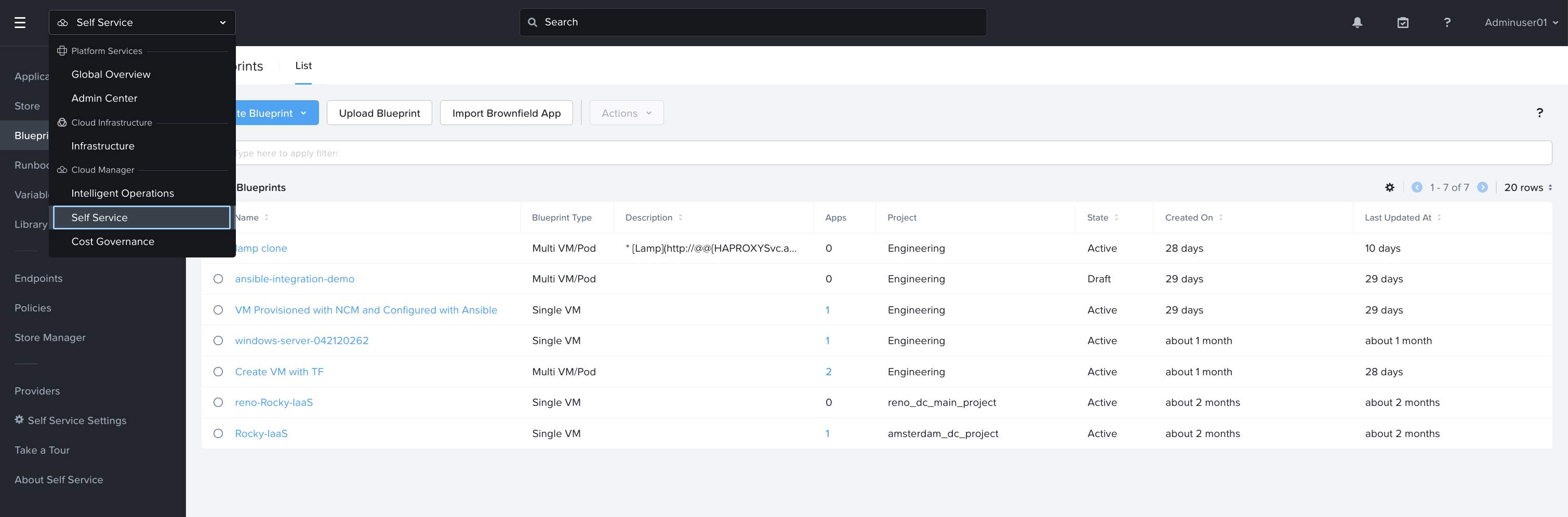
NCM Self-Service provides application automation, orchestration, governance, and lifecycle management capabilities for Nutanix and supported cloud environments.
With NCM 2.0, Self-Service is accessed through Nutanix Central as part of the unified Nutanix Cloud Manager experience. This gives administrators and users a centralized place to design, publish, deploy, manage, and automate applications.
NCM Self-Service provides the following key capabilities:
Together, these capabilities help organizations provide a governed self-service experience for application teams while maintaining control over infrastructure placement, resource consumption, operational workflows, and automation standards.
Blueprints are the foundation of NCM Self-Service application automation.
A blueprint defines the resources, services, configuration, dependencies, and lifecycle actions required to deploy and manage an application. Blueprints can model simple single-VM deployments or complex multi-tier applications with multiple services, dependencies, and day-2 operations.
Within NCM Self-Service blueprints, common blueprint types include:
Single VM Blueprint: An application or service consisting of a single VM, along with its associated deployment scripts and dependencies. Dependencies includes items such as hardware configuration, operating system types and versions and tasks that a deployment will need to step through before completion.
Multi VM/Pod Blueprint: An application or service consisting of one or more VMs, along with each VM’s associated deployment scripts and dependencies. Similar to Single VM blueprints in overall concept, Multi VM/Pod Blueprints are different in that relationships between an application’s VMs can be defined during deployment ensuring, for example, that a database is deployed before the application that depends on that database. In addition to the core application components, Multi VM/Pod Blueprints include configuration for scaling and lifecycle management that allow administrators or triggers to manually or automatically adjust configuration based on application demand. In addition to VM deployments, Multi VM/Pod Blueprints support the deployment of pod-based applications in a Kubernetes environment e.g. Deployments, Containers and Services.
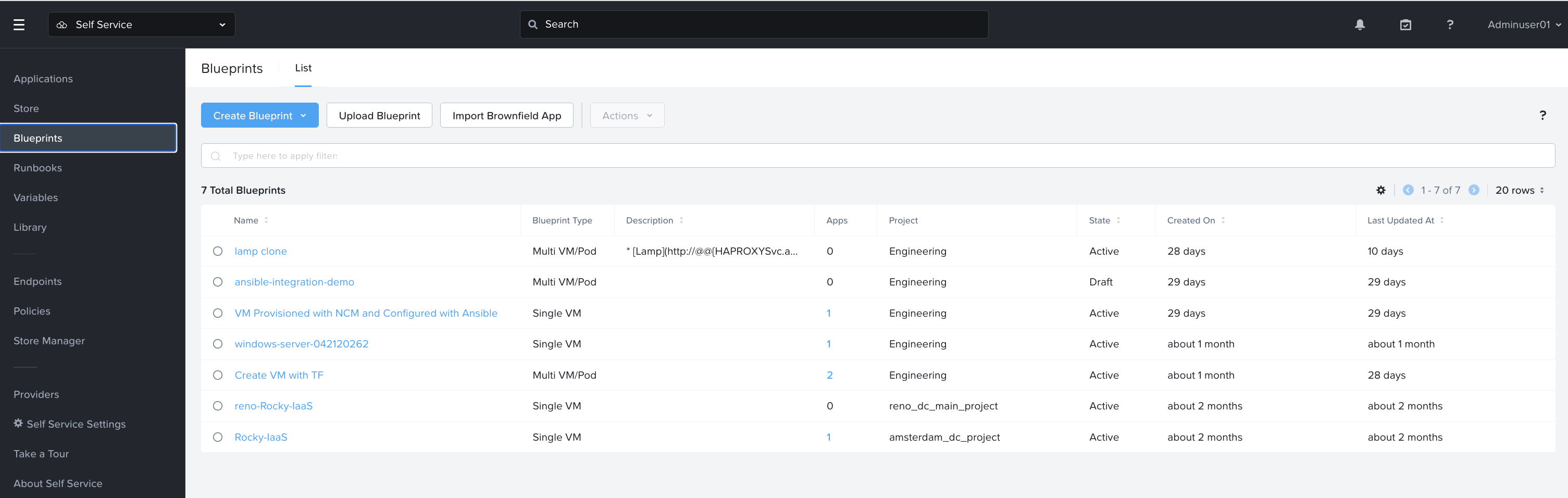
Blueprints can include:
Blueprint-centric design allows administrators to standardize deployment patterns and expose them to users through a governed interface.
NCM Self-Service blueprints support deployment to various on-premises and cloud locations.
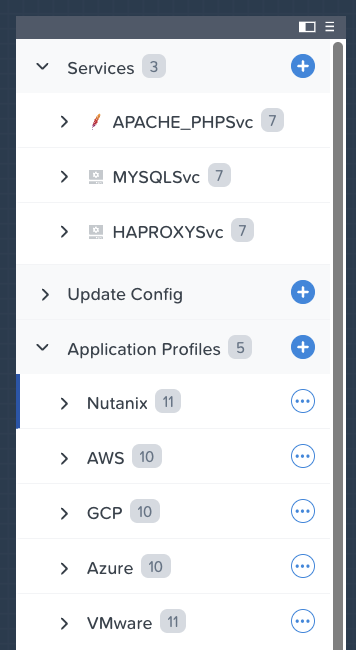
Deployment locations define where a blueprint can be deployed. This may include Nutanix AHV environments, VMware environments, supported public cloud environments, and Kubernetes-based environments.
Deployment locations are important because different environments may have different infrastructure resources, networking configurations, images, credentials, quotas, or operational requirements.
A blueprint can be designed to support one or more deployment locations. This allows teams to create reusable application definitions while still supporting the needs of different environments.
For example, a blueprint may deploy an application to:
By defining deployment locations in Self-Service, administrators can provide flexibility to users while maintaining governance over where applications are allowed to run.
A blueprint can be used to define the complete deployment flow for an application.
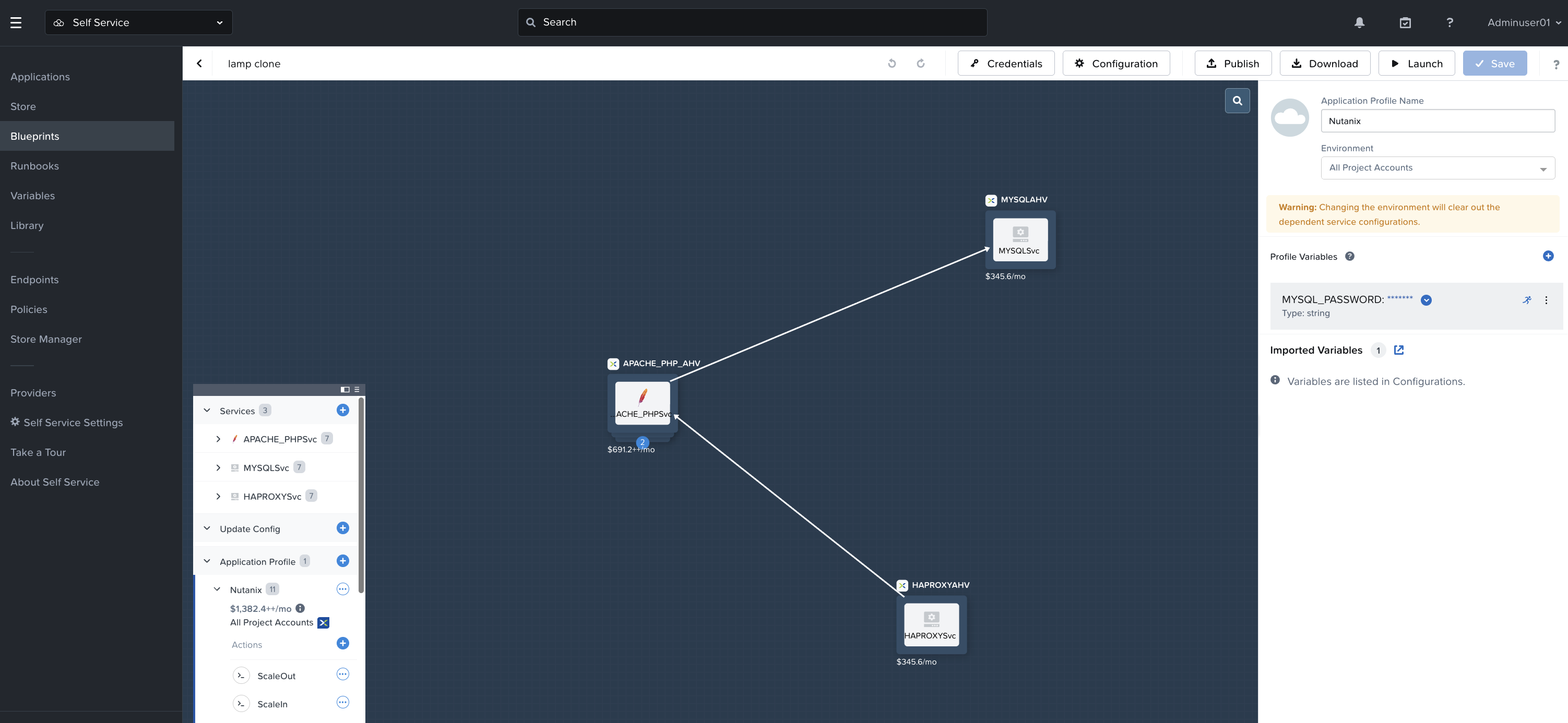
For example, a simple web application blueprint may include:
A more advanced blueprint may include multiple services and dependencies. For example:
Blueprints help reduce manual deployment steps by turning infrastructure and application configuration into a repeatable model.
Instead of asking users to manually request infrastructure, select images, configure networks, install packages, and run scripts, Self-Service allows those steps to be defined once in a blueprint and reused many times.
This helps improve consistency, reduce deployment errors, and accelerate application delivery.
Tasks are used within blueprints to perform specific actions during application deployment or management.
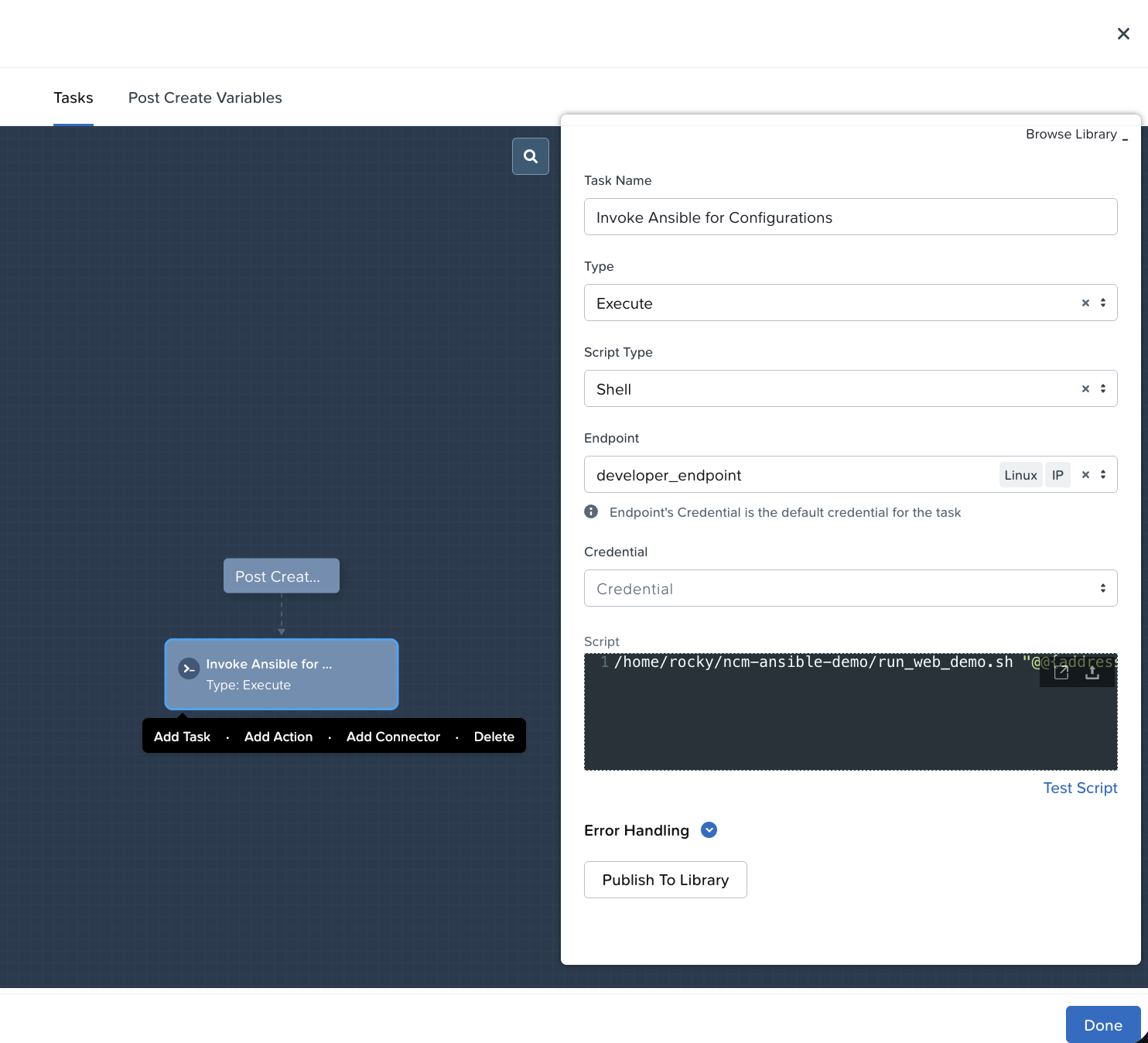
A task can perform actions such as:
Tasks are commonly used during package installation and application configuration. For example, a task may install a web server package, configure firewall rules, update an application configuration file, or register the application with another system.
Tasks can also be used to create dependency logic between different parts of an application. For example, a database may need to be deployed and configured before an application server can connect to it. Blueprint tasks can help define and sequence that logic.
The ability to combine infrastructure configuration with application-level tasks is one of the key values of Self-Service blueprints. It allows teams to model not only where an application runs, but also how it is configured and operated.
In the context of NCM Self-Service, a brownfield application is a collection of services (e.g. VMs) that are not yet managed by Self-Service. Before Self-Service can communicate with those services, the application must be imported into Self-Service as a brownfield application.
Brownfield application key points:
Privileges: Administrative privilege are required to import a brownfield application Brownfield applications do not support snapshot and restore capabilities See Brownfield Apps in Self-Service for detailed information.
Runbooks provide automation for operational workflows.
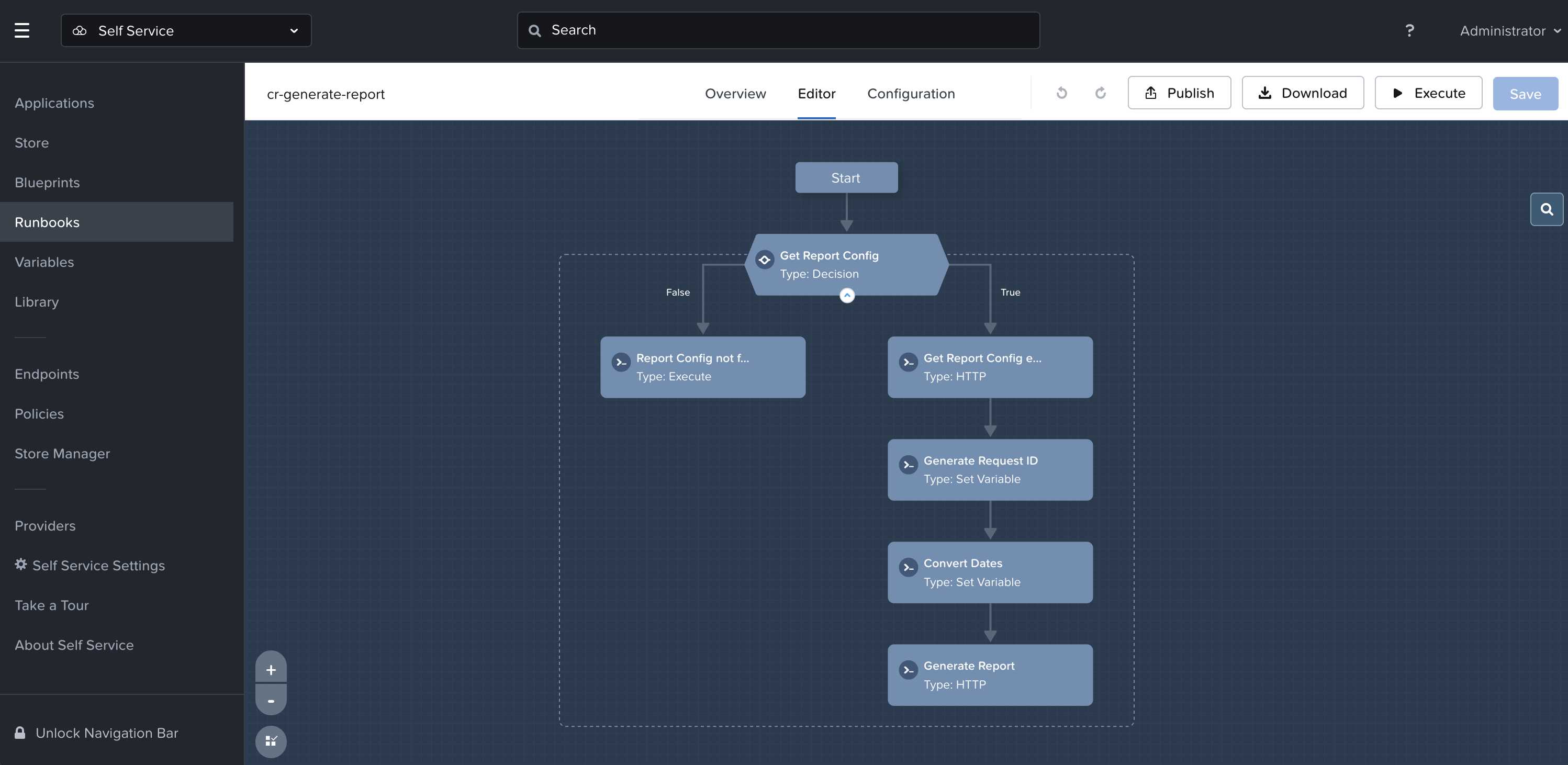
While blueprints are commonly used to define and deploy applications, runbooks are used to automate tasks and processes that may not require a full application deployment.
Runbooks can automate workflows such as:
A runbook is made up of steps. Each step performs a specific action, and those steps can be connected together to define a larger workflow.
Runbooks can be simple or complex. A simple runbook may contain a single REST API call. A more advanced runbook may include multiple branches, conditional logic, input variables, output variables, and calls to several systems.
Runbooks are useful for standardizing repetitive operational work. Instead of requiring an administrator to manually perform the same task multiple times, the process can be defined once and executed consistently.
Common runbook use cases include:
Runbooks can also be used as part of broader event-driven automation workflows. For example, an operational event may trigger a workflow that calls a runbook to collect more information, notify a team, or take a corrective action.
By combining Self-Service runbooks with automation triggers, organizations can reduce manual effort and improve operational consistency.
Endpoints define the systems that Self-Service can connect to when executing blueprint tasks or runbook steps.
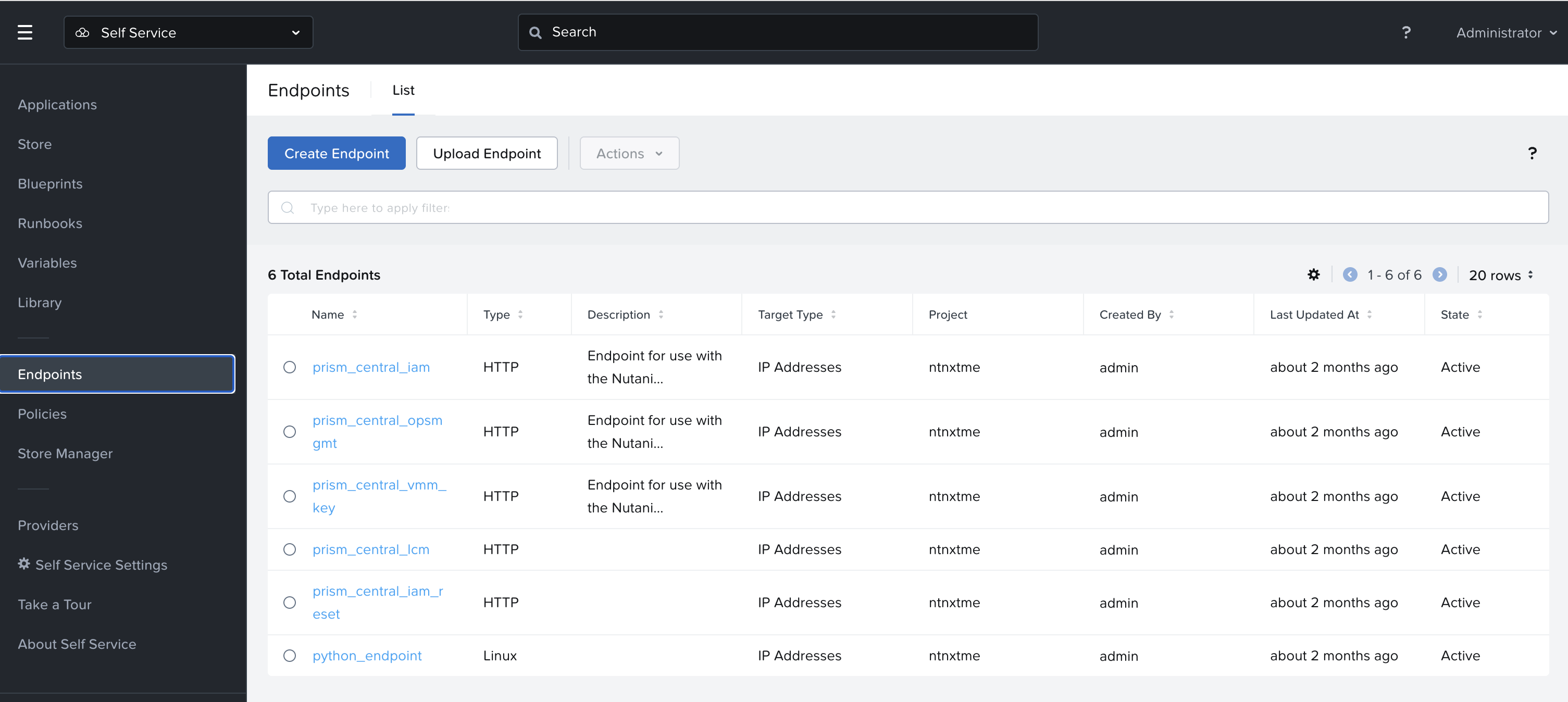
An endpoint can represent a Nutanix management interface, an external REST API, a script execution target, or another system that is part of an automation workflow.
Endpoints allow Self-Service automation to interact with different systems in a controlled and reusable way.
For example, a runbook step that sends a REST API request could send the initial request to one Nutanix management endpoint, save the results of that request into output variables, then run subsequent steps on another endpoint.
This allows a runbook to operate across environments with one or more Nutanix management endpoints, as well as arbitrary or user-configured endpoints.
Endpoints are useful for workflows that need to:
By defining endpoints centrally, administrators can simplify how automation workflows connect to the systems they need.
Global Variables allow administrators to define reusable values that can be referenced across Self-Service blueprints and runbooks.
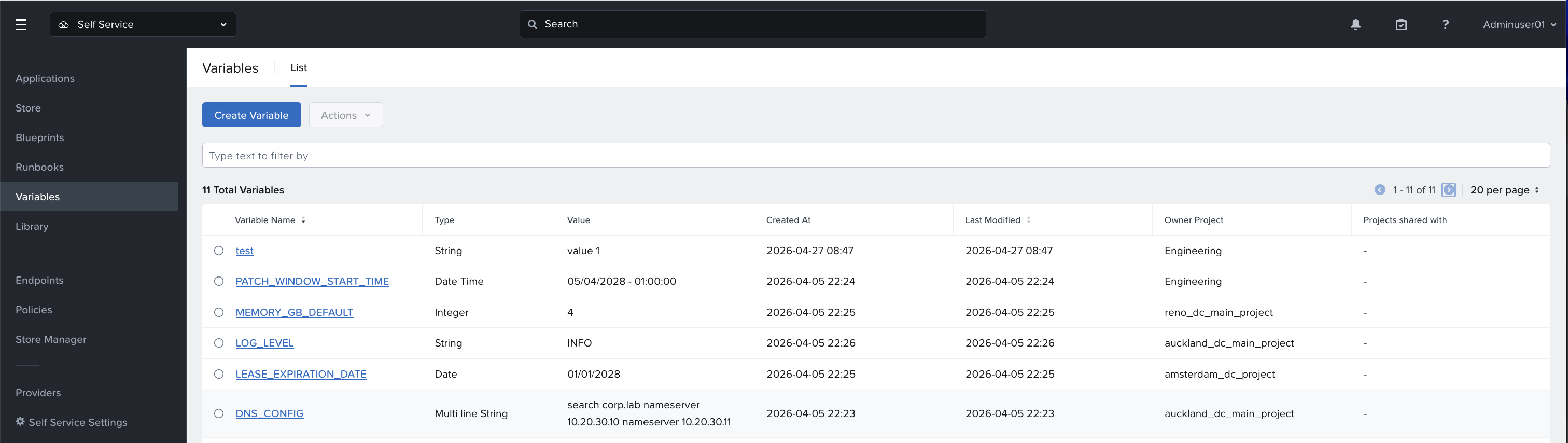
Instead of defining the same value repeatedly in multiple automation artifacts, a Global Variable can be created once and reused where needed. This helps improve consistency, reduce duplication, and simplify updates across Self-Service content.
Global Variables are useful for values such as:
When a blueprint or runbook references a Global Variable, the value is managed centrally. This allows teams to build more consistent automation patterns and reduce the need to manually update the same value in multiple places.
For example, an organization may have several blueprints and runbooks that reference the same internal endpoint, support email address, application version, or environment label. Without Global Variables, each blueprint or runbook may need to define that value separately. With Global Variables, the value can be defined once and reused.
Global Variables are especially helpful in environments where multiple teams create or maintain Self-Service content. They provide a centralized way to manage common values while still allowing blueprints and runbooks to remain modular and reusable. These variable names and types should be planned carefully because certain properties may not be editable after creation.
Global Variables can help teams:
The NCM Self-Service Store provides a curated catalog of applications and automation content that users can deploy.
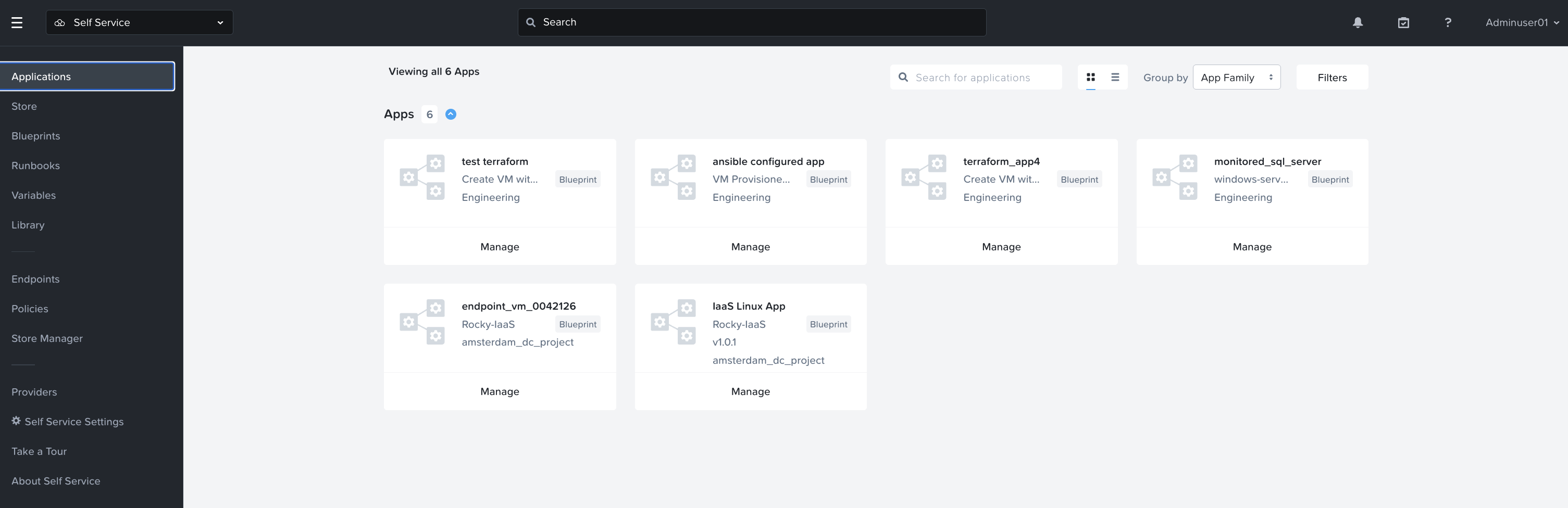
Instead of requiring users to build applications manually, administrators can publish approved blueprints to the Self-Service Store. Users can then select from those published items and deploy applications through a guided experience.
In NCM 2.0, the Self-Service Store is accessed through the Self-Service experience in Nutanix Central, providing a centralized catalog for approved application deployments.
Self-Service Store application deployment helps organizations provide a cloud-like consumption experience while maintaining governance and control.
A blueprint must be published to the Self-Service Store before users can deploy it from the catalog. Once published, the store, items can include user-facing details such as name, description, icon, version, and deployment options.
Self-Service Store items can also go through approval workflows, depending on the policies configured for the project or environment.
The deployment process for an application can be monitored via the audit tab within the app.
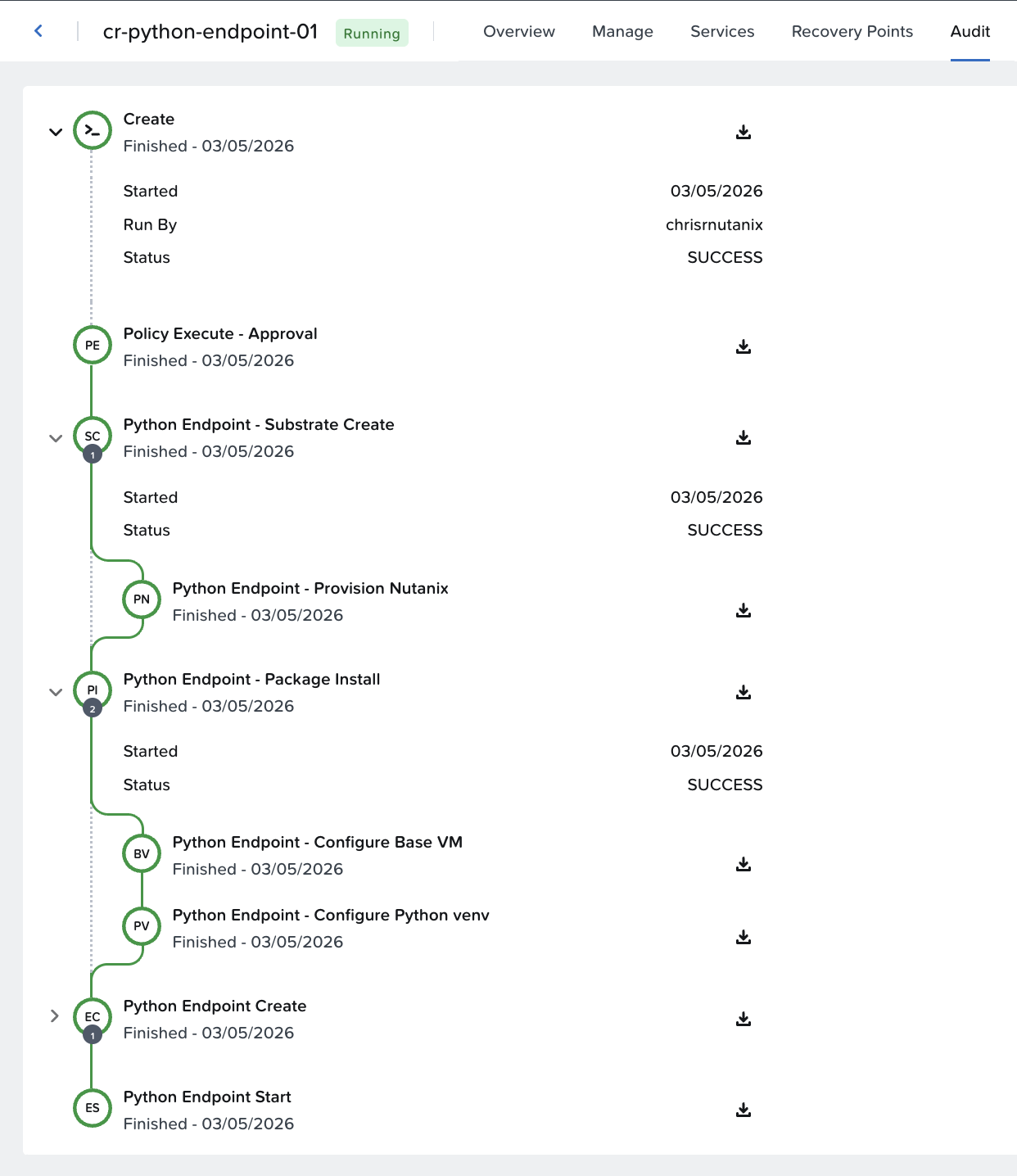
This provides a balance between self-service access and administrative control. Users can deploy approved applications without needing direct access to all underlying infrastructure controls, while administrators maintain governance over what can be deployed and where.
NCM Self-Service may include built-in application blueprints that provide examples or starting points for common application deployments.
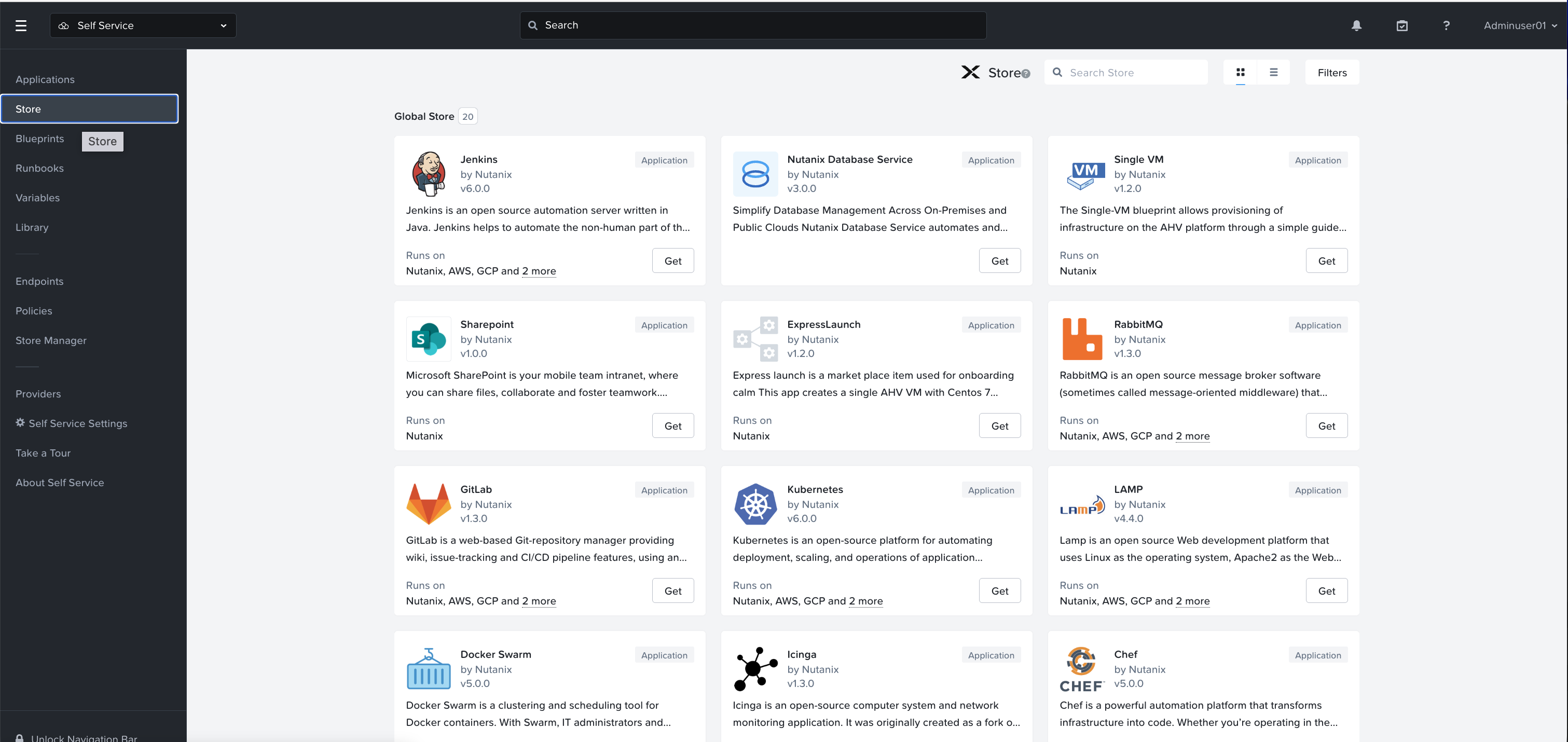
Built-in blueprints can help users learn how Self-Service models applications and automation workflows. They can also help administrators accelerate creation of their own application catalog by starting from an existing pattern.
Administrators can publish approved blueprints to the Self-Service Store so users can deploy them in a consistent and governed way.
When creating production-ready Self-Service Store items, administrators should review and update blueprint configuration, images, credentials, variables, deployment locations, and policies to align with organizational standards.
NCM Self-Service uses projects to define how and where a VM or application can be deployed.
A project is a collection of users, infrastructure resources, quotas, policies, and related configurations that establish deployment boundaries for Self-Service users.
Projects help administrators control access and consumption while still enabling users to deploy and manage applications through Self-Service.
A project can include:
Project-based governance provides the ability to control which users are permitted to carry out specific tasks, where those tasks can be carried out, and how many resources a user’s deployment may consume.
This is important because self-service access should not mean unrestricted access. Projects allow administrators to define boundaries that align with team ownership, infrastructure capacity, security requirements, and operational standards.
For example, a project may be created for a development team. That project can define:
This allows users to deploy applications within approved boundaries without requiring infrastructure administrators to manually process every request.
Project-based governance is a core part of the Self-Service operating model. It helps organizations provide agility to users while maintaining control over infrastructure resources.
Because Self-Service uses projects to define deployment boundaries and resource access, analysis of workload allocations within a project is easily visible.
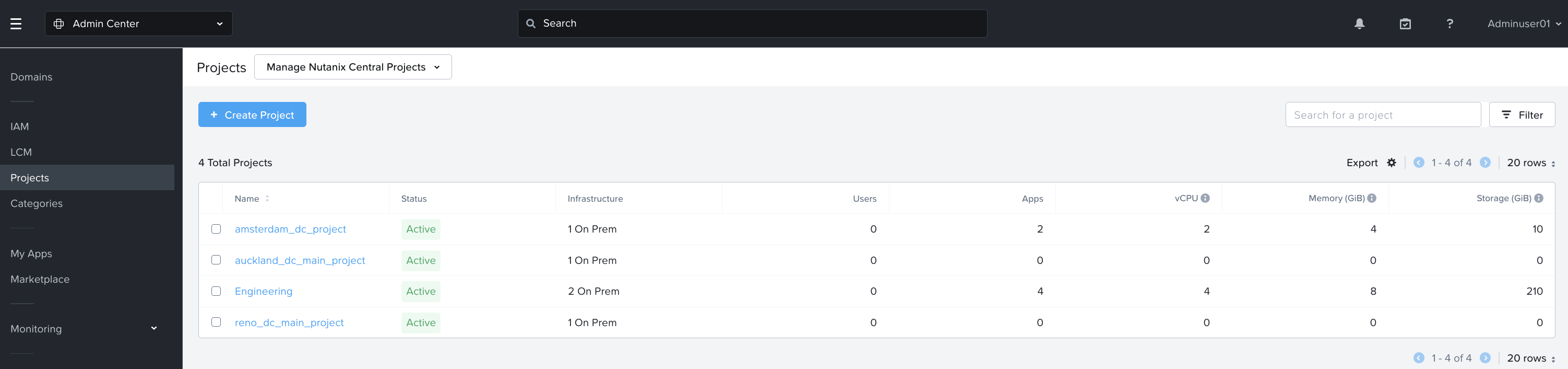
A user can quickly see resource utilization for deployed applications within a project, the number of deployed VMs associated with the project, and quota consumption for that project.
Project analysis helps administrators and project owners understand how resources are being used.
This visibility helps teams manage consumption more effectively. It also supports better communication between infrastructure teams and application owners.
Project analysis is especially useful when combined with governance and cost visibility. For example, project-level utilization can help teams understand how infrastructure resources are being consumed by different teams, applications, or business units.
NCM Self-Service policies provide governance for application deployment and management.
Policies help administrators define rules for how Self-Service users can consume infrastructure and execute automation workflows.
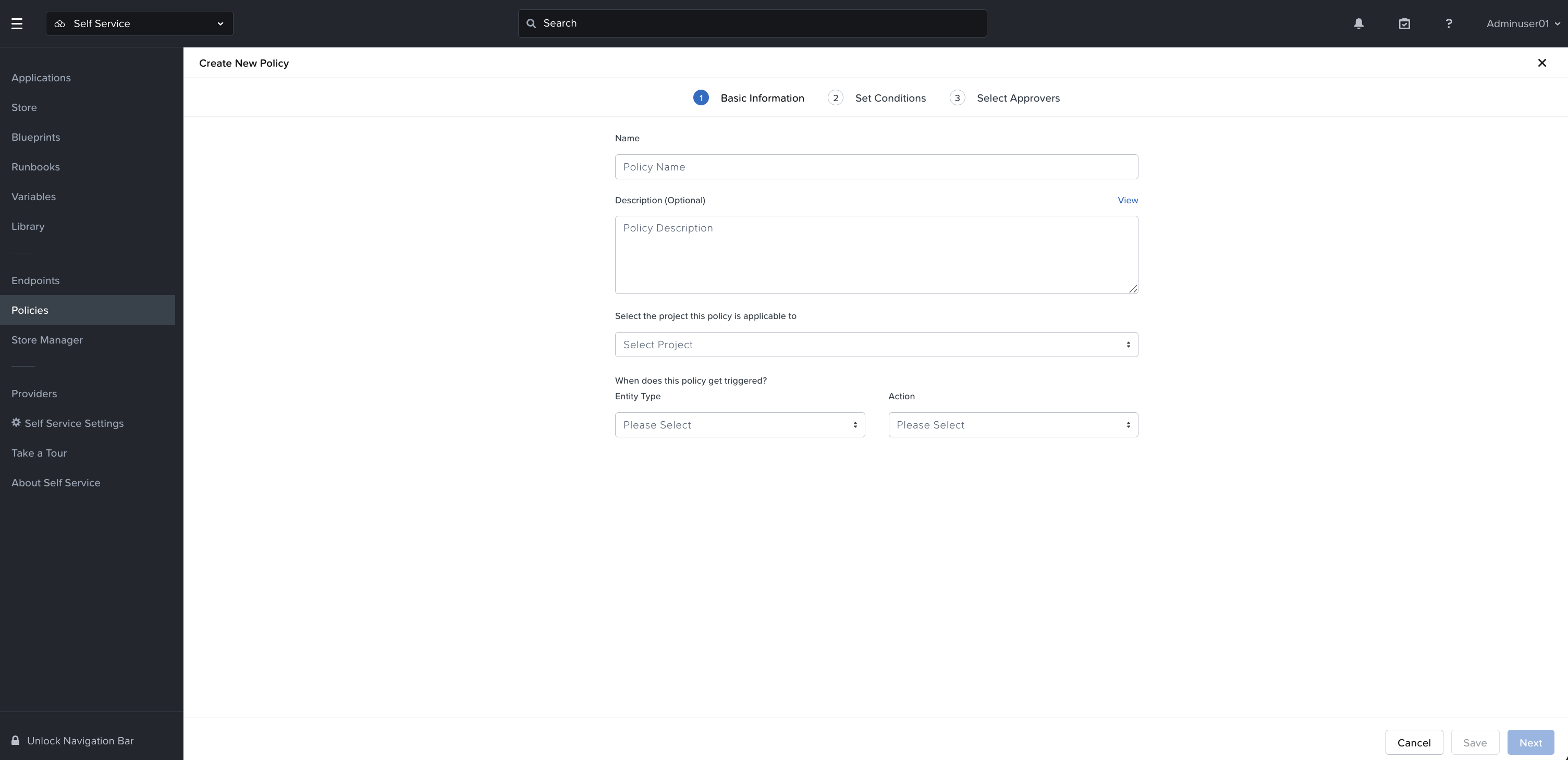
All NCM Self-Service policies are managed through the Policy Engine within the Self-Service UI.
In NCM 2.0, these policy workflows are accessed through Self-Service in Nutanix Central.
Common policy types include:
Approval policies allow administrators to require approval before certain actions are performed. For example, a policy may require approval before a user deploys an application, scales an application, or performs a specific day-2 action.
Scheduler policies allow administrators to define when certain actions should occur. For example, an application may be scheduled to start or stop at specific times to reduce resource consumption in development or test environments.
Application governance policies help define how applications are controlled throughout their lifecycle. These policies can help ensure that users follow approved operating standards.
Policies are important because they help Self-Service balance agility with control. Users can perform authorized actions through the catalog and automation workflows, while administrators maintain governance over the actions that require review, approval, or scheduling.
In addition to the extensive management capabilities available in the Self-Service UI, NCM Self-Service provides an extremely broad, developer friendly DSL. A DSL, or Domain Specific Language allows developers and scripting administrators to leverage Self-Service using standard programmatic approaches. The NCM Self-Service DSL specifically is an open-source Python language enabling the programmatic control of Self-Service features directly from your Python scripts.
DSL can be used for workflows such as:
Using DSL can help teams standardize how Self-Service content is created, reviewed, and maintained.
Some Self-Service DSL highlights include:
Ease of use: Straight-forward syntax enabling the easy consumption of key NCM Self-Service features such as blueprint creation, application launch and day-2 operations
Platform agnostic: Python is supported on a wide range of operating systems, making the Self-Service DSL’s code usable in an equally wide range of environments
Portability: A complete, DSL-based deployment can be packaged and moved between environments with minimal effort, or stored in source control systems such as GitHub or GitLab
The Self-Service UI is useful for visual design and day-to-day use, while DSL is useful for teams that prefer a code-based approach to managing automation content.
NCM Self-Service provides application automation, Self-Service Store, governance, and runbook automation capabilities as part of Nutanix Cloud Manager.
With NCM 2.0, Self-Service is accessed through Nutanix Central, providing a centralized experience for designing, publishing, deploying, managing, and automating applications.
Key capabilities include:
Together, these capabilities help organizations provide a governed self-service experience for application teams while maintaining infrastructure control, operational consistency, and automation reuse.
©2025 Nutanix, Inc. All rights reserved. Nutanix, the Nutanix logo and all Nutanix product and service names mentioned are registered trademarks or trademarks of Nutanix, Inc. in the United States and other countries. All other brand names mentioned are for identification purposes only and may be the trademarks of their respective holder(s).