» Download this section as PDF (opens in a new tab/window)
NC2 now extends NCP into the Google Cloud ecosystem, providing a true hybrid multicloud infrastructure stack. NC2 on Google Cloud allows organizations to run directly on Google Compute Engine (GCE) bare-metal instances in their own Google Cloud Virtual Private Cloud (VPC).
The solution is applicable to the configurations below (list may be incomplete, refer to documentation for a fully supported list):
Core Use Case(s):
Management interfaces(s):
Supported Environment(s):
Upgrades:
Compatible Features:
Nutanix Cloud Clusters (NC2) on Google Cloud integrates Nutanix Cloud Platform (NCP) with the underlying Google Cloud infrastructure. The solution uses the following components:
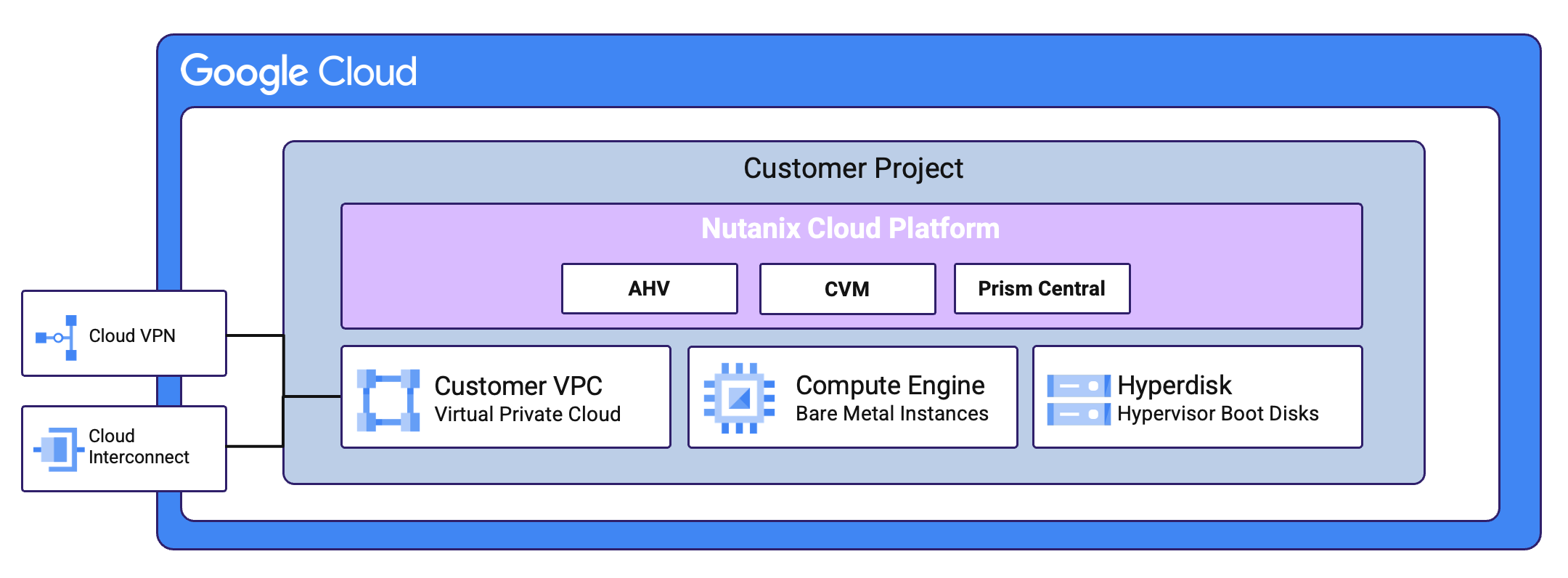 NC2 on Google Cloud - Overview
From a high-level the NC2 Portal is the main interface for provisioning Nutanix Clusters on Google Cloud and interacting with Google Cloud.
The provisioning process can be summarized with the following high-level steps:
The following shows a high-level overview of the NC2 on Google Cloud interaction:
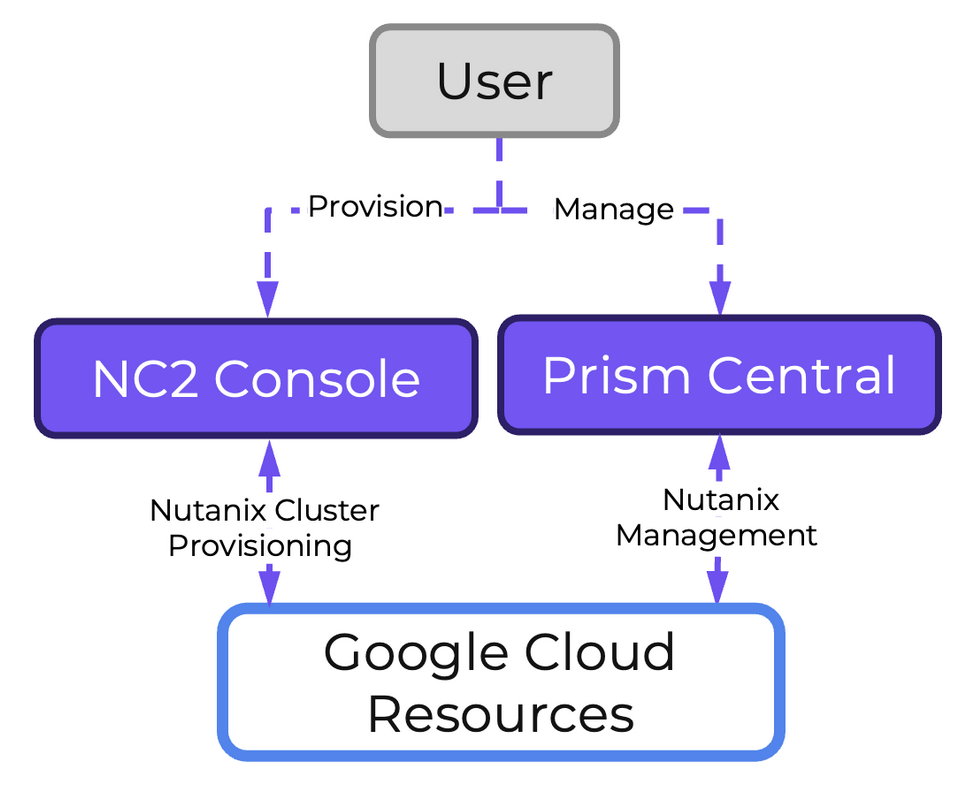 NC2 on Google Cloud - Management
Given that the hosts are bare metal, the solution has full control over storage and network resources similar to a typical on-premises Nutanix deployment, witht he exception that Google Cloud’s Hyperdisk service is used to provide the AHV Hypervisor boot volumes.
Nutanix Clusters on Google Cloud uses a partition placement policy with 7 partitions. Hosts are striped across these partitions which correspond with racks in an on premises Nutanix deployment. This ensures you can have 1 or 2 (with a 2N/2D configuration) full “rack” failures and still maintain availability.
Core storage is the exact same as you’d expect on any Nutanix cluster, passing the “local” storage devices to the CVM to be leveraged by Stargate.
NC2 utilizes Flow Virtual Networking in Google Cloud to create an overlay network to ease administration for Nutanix administrators and reduce networking constraints across Cloud vendors. Flow Virtual Networking is used to abstract the Google Cloud native network by creating overlay virtual networks. On the one hand this abstracts the underlying network in Google Cloud, while at the same time, it allows the network substrate (and its associated features and functionalities) to be consistent with the customer’s on-premises Nutanix deployments. You will be able to create new virtual networks (called Virtual Private Clouds or VPCs) within Nutanix, subnets in any address range, including those from the RFC1918 (private) address space and define DHCP, NAT, routing, and security policy right from the familiar Prism Central interface.
You can deploy Nutanix Cloud Clusters (NC2) on Google Cloud into an existing Google Cloud Virtual Private Cloud (VPC) and its subnets, or you can create a VPC and subnets specifically for NC2 in a project at deployment. VMs and containers running on the cluster can connect to the internet, native Google Cloud services, and on-premises datacenters using WAN networking (virtual private network, Google Cloud Router, Multiprotocol Label Switching).
Flow Virtual Networking for NC2 on Google Cloud has the following capabilities:
Flow Virtual Networking creates an overlay network for user VMs, allowing you to create virtual networks (VPCs) and subnets in Prism Central independent of the underlying Google Cloud network topology.
Flow Virtual Networking provides a unified networking experience across on-premises and Google Cloud environments, simplifying hybrid connectivity and policy management.
For communication between user VMs on different physical hosts, the overlay network uses Geneve encapsulation.
User VMs can connect to external Google Cloud networks, the internet, and native Google Cloud services, such as Google Kubernetes Engine (GKE) and BigQuery.
You can provision user VMs to a network regardless of network address translation (NAT).
> If you provision a user VM to a NAT network, assign a floating IP address to the user VM to facilitate connectivity from outside the Flow Virtual Networking overlay networks.
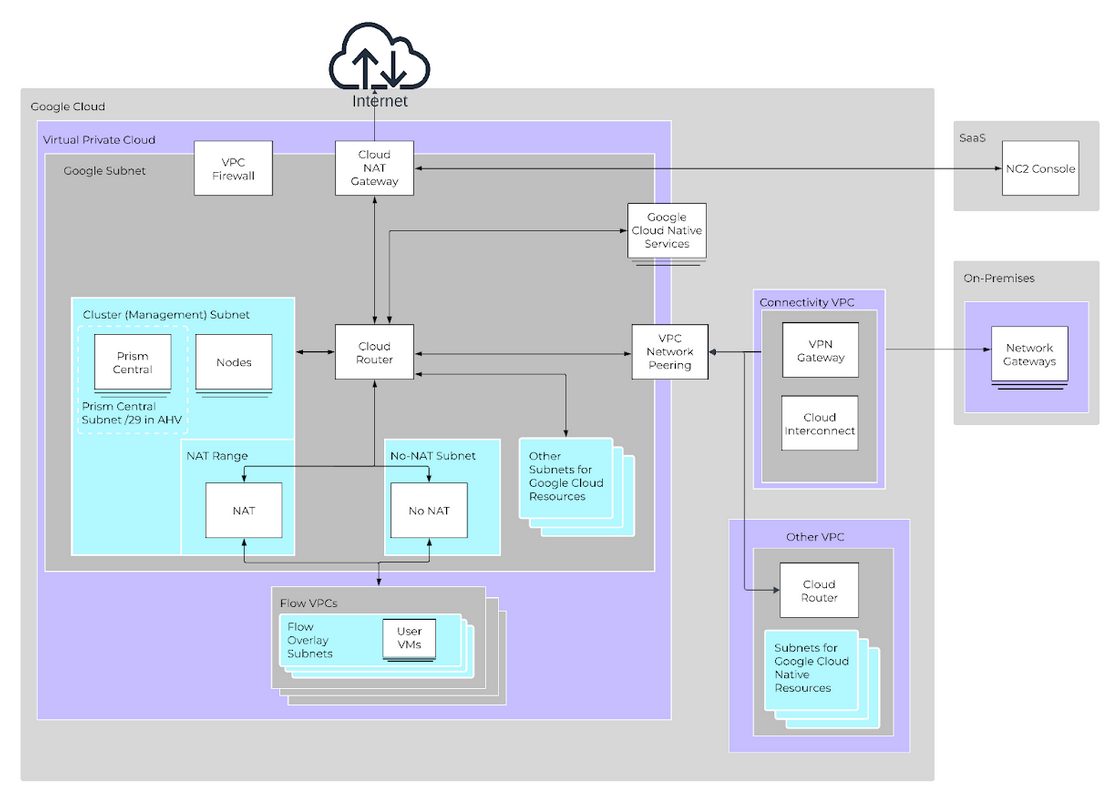
Prism Central contains the control plane for Flow Virtual Networking. The User VMs using the Flow VPC(s) can communicate to native Google Cloud services and allows the VMs to have parity with native Compute Engine VM instances.
Unlike NC2 in Azure, NC2 in Google Cloud does not require Flow Gateway VMs (FGWs).
At a high level, the deployment process for Nutanix Cloud Clusters (NC2) on Google Cloud follows these steps:
More to come!
©2025 Nutanix, Inc. All rights reserved. Nutanix, the Nutanix logo and all Nutanix product and service names mentioned are registered trademarks or trademarks of Nutanix, Inc. in the United States and other countries. All other brand names mentioned are for identification purposes only and may be the trademarks of their respective holder(s).